Here’s a question I get asked more than almost any other: “If my analytics tool doesn’t use cookies, what’s it actually collecting?” The honest answer is that even the most privacy-friendly setup still sees one thing from every visitor — an IP address. It arrives with every single request your server receives, whether you want it or not. The real question isn’t whether you can avoid it. It’s what you do with it.
IP address anonymization is the quiet workhorse of privacy-first analytics. It’s the technique that lets a tool count visitors, spot patterns, and give you a rough sense of geography — all without ever storing the one piece of data that most directly points back to a real person. In this guide, I’ll walk through what IP anonymization actually is, the different ways tools implement it, and why “anonymized IP” doesn’t always mean what marketers think it means.
This is part of our wider work on privacy-compliant web analytics — if you haven’t read that overview yet, it’s a good companion to this deeper dive.
Why an IP Address Is Such a Big Deal
An IP address feels harmless. It’s just a string of numbers — something like 203.0.113.47. But in privacy terms, it’s loaded. Regulators in the EU have treated IP addresses as personal data for years, because in combination with other information, they can single out an individual or a household. Your internet provider knows exactly which subscriber a given IP belonged to at a given moment. That’s the link that makes privacy people nervous.
For analytics, the IP serves three legitimate purposes: rough geolocation (which country or city a visit came from), distinguishing one visitor from another within a short window, and filtering out bots and internal traffic. The trick is that all three of these jobs can be done without permanently storing the full address. That’s where anonymization comes in.
An IP address is the difference between “someone in Berlin visited your pricing page” and “the person at this specific home connection visited your pricing page.” Anonymization keeps the first insight and discards the second.
How IP Anonymization Actually Works
There isn’t one single method. Tools use different techniques, and they offer very different levels of protection. Understanding the differences matters, because a vendor saying “we anonymize IPs” could mean almost anything. Here are the main approaches you’ll encounter.
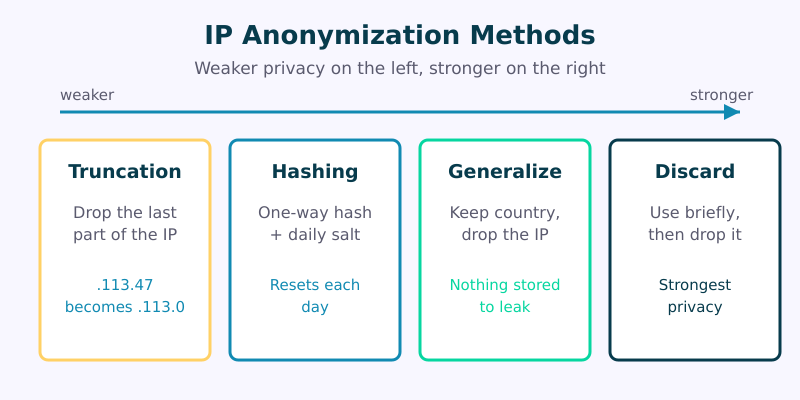
1. Truncation (Masking the Last Octet)
The most common method — and the one Google Analytics historically used — is truncation. The tool simply throws away the final part of the address. An IPv4 address like 203.0.113.47 becomes 203.0.113.0; for IPv6, a larger chunk is zeroed out. You keep enough information for country-level geography but lose the precision that points to a single connection.
Truncation is fast, simple, and irreversible at the level it operates. Its weakness is that the masked address still narrows things down to a fairly small group of users sharing that network block. It’s a real improvement, but it’s not perfect anonymity.
2. Hashing With a Rotating Salt
A stronger approach runs the IP through a one-way cryptographic hash function, combined with a secret value called a salt that changes regularly — often daily. The output is a fixed-length fingerprint that can’t be reversed back into the original address. Because the salt rotates, the same visitor produces a different hash tomorrow, which prevents long-term tracking across days.
This is roughly how Plausible and Fathom handle visitor counting. The hash lets them tell two visits apart within a single day without ever storing anything that survives until the next one. Once the salt rotates, yesterday’s hashes become meaningless noise.
3. Generalization Into Geographic Buckets
Some tools take the IP, look up its approximate location, record only “Germany” or “Bavaria,” and then discard the address entirely before anything is written to disk. The IP exists for a fraction of a second in memory, performs its one useful job, and never gets stored. From a data-retention standpoint, this is one of the cleanest patterns: there is simply no IP to leak, subpoena, or breach.
4. Immediate Discard
The most minimal privacy-first tools don’t try to do anything clever with the IP at all. They use it for the live request, perhaps to filter obvious bots, and then drop it. No geography, no fingerprint, no hash — nothing retained. You lose some analytical richness, but you gain the strongest possible position: data you never keep is data you can never expose.
Comparing the Methods at a Glance
Each method trades off privacy against analytical usefulness. Here’s how they line up.
| Method | Privacy Strength | Keeps Geography? | Reversible? |
|---|---|---|---|
| Truncation | Moderate | Country/region | No (but narrows to a network block) |
| Hashing + rotating salt | Strong | Only if looked up first | No |
| Generalization + discard | Strong | Yes (bucketed) | No (address not stored) |
| Immediate discard | Strongest | No | Nothing to reverse |
There’s no single “right” answer. A privacy-conscious media site that wants a regional readership breakdown might choose generalization. A tool that wants the absolute minimum footprint might discard immediately. What matters is knowing which one your vendor uses — and being able to explain it.
“Anonymized” Doesn’t Always Mean Anonymous
Here’s the part that trips people up. Masking the last octet of an IP is often called “anonymization,” but on its own it doesn’t necessarily make the data legally anonymous. If you also store a precise timestamp, a unique user agent, screen resolution, and a handful of other signals, those fragments can sometimes be recombined to re-identify a person even after the IP is masked. Anonymization is only as strong as the whole data picture, not the IP field in isolation.
This is why privacy-first tools tend to collect very little alongside the IP in the first place. The fewer correlating signals you keep, the more genuinely anonymous a truncated or hashed IP becomes. If you’re auditing a setup, don’t just ask “do you anonymize the IP?” — ask “what else do you store next to it?” That question reveals far more.
If you want to walk through that kind of review yourself, our piece on auditing a GA4 setup for privacy risks covers the broader checklist.
A Quick Practical Checklist
- Ask the direct question. Does the tool store full IPs at any stage, even briefly in logs? Server access logs are a common blind spot.
- Find out the method. Truncation, hashing, or discard — each has different implications for what you can claim in your privacy policy.
- Check the salt rotation. If your tool hashes IPs, how often does the salt change? Daily rotation is a good baseline.
- Look at the surrounding data. An anonymized IP next to a rich fingerprint isn’t truly anonymous.
- Document it. Whatever the answer, write it down. If a visitor or regulator asks how you handle their address, you should be able to answer in one sentence.
Frequently Asked Questions
Is an IP address really considered personal data?
In the EU, courts have repeatedly treated IP addresses as personal data, because they can identify an individual when combined with information held by an internet provider. Treating them as personal data is the safe default, regardless of where you operate.
Does masking the last octet make an IP fully anonymous?
Not always. Truncation greatly reduces precision, but if you store other distinguishing signals alongside the masked IP, the combination can sometimes re-identify a visitor. True anonymity depends on the whole dataset, not just the IP field.
Do privacy-first analytics tools store IP addresses?
Most don’t store them in any lasting form. Tools like Plausible and Fathom use the IP momentarily to generate a daily-rotating hash, then discard the original address. Some tools discard it entirely after a quick geography lookup.
Can I anonymize IPs in my server logs too?
Yes, and you should. Your web server’s access logs often record full IP addresses by default, separate from your analytics tool. Configuring your server to truncate or omit them closes a common gap that pure analytics-side anonymization misses.
The Bottom Line
IP anonymization is one of those topics that sounds like a checkbox but is really a spectrum. Truncation, hashing, generalization, and discard all reduce risk in different amounts, and the word “anonymized” can hide a lot of variation underneath. The privacy-first instinct is simple: collect the IP only for the brief job it needs to do, strip or transform it before anything touches disk, and keep so little alongside it that re-identification becomes impractical.
Get that right, and you can run honest, useful analytics while being able to look any visitor in the eye and explain exactly what happens to their address. That’s the whole point of doing this the privacy-first way.