If you’re running a WordPress site in 2026, you’ve probably noticed the conversation around web analytics has shifted dramatically. GDPR enforcement is tightening, Google’s consent mode requirements keep changing, and your visitors are more privacy-aware than ever. The good news? You don’t have to choose between understanding your audience and respecting their privacy.
I’ve spent the last twelve years helping businesses set up analytics — and the last three years specifically guiding WordPress site owners toward tools that don’t require cookie banners, don’t share data with ad networks, and still give you the insights you need to grow. This roundup is part of my larger guide to Google Analytics alternatives, focused specifically on what works best with WordPress.
Let me walk you through the five best privacy-first analytics options for WordPress in 2026, with honest assessments of each one.
What Makes Analytics “Privacy-First”?
Before we get into specific tools, let’s clarify what “privacy-first” actually means — because marketers throw that term around loosely.
A genuinely privacy-first analytics tool meets these criteria:
- No personal data collection. No IP addresses stored, no fingerprinting, no cross-site tracking profiles.
- No cookies required. The tool works without setting cookies, which means no consent banners needed in most jurisdictions. Check with our Consent Logic Planner to verify.
- Data ownership stays with you. Your analytics data isn’t shared with third parties, used for advertising, or monetized in any way.
- Compliance by design. The tool is built to comply with GDPR, CCPA, PECR, and similar regulations out of the box — not as an afterthought.
- Minimal data collection. Only the metrics you actually need are collected. No “just in case” surveillance.
This is the key difference between privacy-first tools and traditional analytics platforms like GA4. Google Analytics is designed to feed an advertising ecosystem. Privacy-first tools are designed to answer one question: how is my website performing?
Every tool on this list meets these criteria. They differ in features, price, hosting model, and WordPress integration — so let’s dig in.
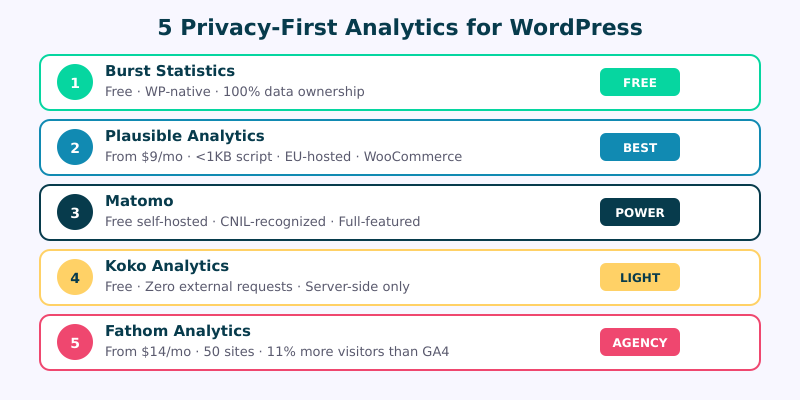
1. Burst Statistics — Best Free WordPress-Native Option
Burst Statistics has become a quiet powerhouse in the WordPress analytics space. Developed by the team behind Complianz (one of the most popular GDPR cookie consent plugins), Burst was built from the ground up as a WordPress-native analytics solution.
What makes it stand out: Burst stores all your analytics data directly in your WordPress database. There’s no external service, no third-party scripts, and zero data leaving your server. You get 100% data ownership by default — not as an upgrade or premium feature.
The plugin adds a clean dashboard widget right inside your WordPress admin, so you don’t need to juggle between tabs or remember another login. You get pageviews, referrers, device breakdowns, and goal tracking — all without leaving the interface you’re already using every day.
Pricing: Completely free. There’s a Pro version starting at around €45/year that adds goals, UTM campaign attribution, and more detailed reporting, but the free tier is genuinely useful.
Best for: WordPress site owners who want simple, reliable analytics without any external dependencies or monthly fees. Burst has been growing fast through 2025 and into 2026, and the community around it is active and helpful.
Limitations: Because it’s WordPress-native, it only works for WordPress sites. The reporting isn’t as polished as Plausible or Fathom, and high-traffic sites may notice some database overhead. There’s no standalone dashboard you can share with clients without granting WordPress admin access.
2. Plausible Analytics — Best Overall for WordPress
If I had to recommend one privacy-first analytics tool for most WordPress users, it would still be Plausible. I’ve been recommending it since 2022, and the product has only gotten better.
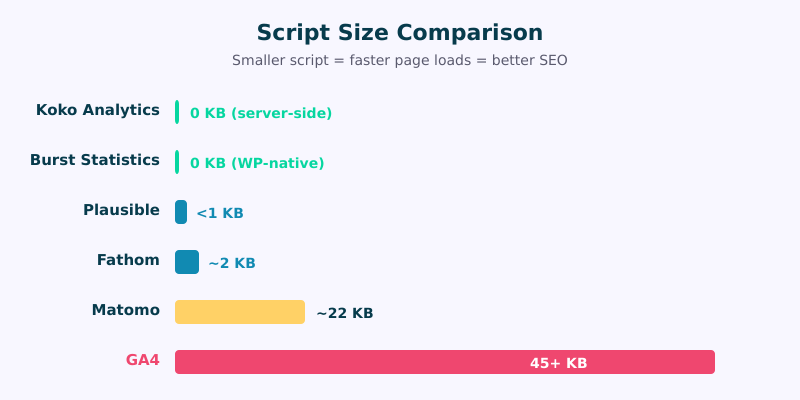
What makes it stand out: Plausible’s tracking script is under 1KB — compare that to GA4’s 45KB+ payload. That’s not a marginal difference; it’s a meaningful impact on your Core Web Vitals scores. For WordPress sites where page speed directly affects SEO rankings, this matters.
Plausible offers an official WordPress plugin that makes setup trivial. You install the plugin, enter your domain, and you’re tracking within minutes. If you need a step-by-step walkthrough, I’ve written a dedicated guide to setting up Plausible in 10 minutes.
The WooCommerce integration tracks revenue, purchase events, and conversion funnels without any additional cookies. Search Console integration pulls in your keyword data so you can see what people searched to find you — all inside one clean dashboard.
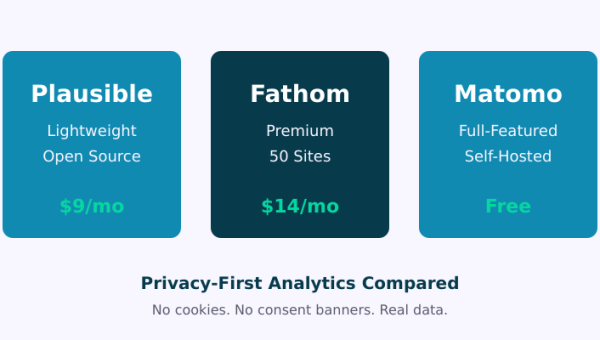
Pricing: Starts at $9/month for up to 10K monthly pageviews. EU-hosted on European-owned infrastructure, so data never touches US servers.
Best for: WordPress site owners and small businesses who want a polished, low-maintenance analytics solution with excellent WordPress integration. If you’re migrating from Google Analytics, Plausible is the smoothest transition.
Limitations: No self-hosted free tier (the self-hosted Community Edition requires technical skill). No heatmaps or session recordings. The $9/month can add up if you’re running many low-traffic sites.
3. Matomo — Best Full-Featured Self-Hosted Option
Matomo is the veteran of privacy-first analytics. Originally launched as Piwik back in 2007, it’s been providing a GA alternative longer than most tools on this list have existed. If you need the depth of Google Analytics without the Google part, Matomo is your answer.
What makes it stand out: Matomo is the most feature-rich option here by a significant margin. You get full visitor logs, custom dimensions, event tracking, e-commerce analytics, A/B testing, heatmaps, session recordings (in the premium version), and a tag manager. It’s also one of the few tools officially recognized by France’s CNIL as compliant when configured correctly — a benchmark many organizations use as their privacy standard.
The self-hosted version is completely free and open source. You install it on your own server (or alongside your WordPress installation), and you have full control over every byte of data collected. For WordPress, there’s an official plugin that handles the tracking code injection and provides a dashboard widget.
Pricing: Self-hosted is free. Matomo Cloud starts at EUR 23/month. Premium features like heatmaps, session recordings, and A/B testing are paid add-ons for self-hosted (one-time purchase) or included in higher cloud tiers.
Best for: Organizations that need enterprise-grade analytics with complete data sovereignty. Matomo is particularly strong for sites that need to comply with strict European privacy regulations or operate in sensitive industries like healthcare, finance, or government. For a deeper feature comparison, see my Plausible vs Fathom vs Matomo analysis.
Limitations: The self-hosted version requires server maintenance, updates, and database management. The interface is functional but not as clean as Plausible or Fathom. There’s a steeper learning curve — this is not a “set and forget” tool. Cloud pricing gets expensive at higher traffic tiers.
4. Koko Analytics — Best Lightweight Free Plugin
Koko Analytics is the minimalist’s dream. If you run a personal blog or a simple business site and just want to know how many people visit your pages — without the complexity of a full analytics suite — Koko is exactly what you need.
What makes it stand out: Koko Analytics makes zero external requests. None. There’s no JavaScript tracking file loaded from a CDN, no external API calls, no font requests — nothing. All tracking is handled server-side within your WordPress installation. This makes it the single best option for page speed, since it adds literally zero bytes to your front-end payload.
The plugin is completely free with no premium tier, no upsells, and no “freemium” limitations. What you see is what you get, and the developer (Danny van Kooten, who also created the popular MC4WP plugin) has committed to keeping it that way.
Pricing: Free. Period.
Best for: Bloggers, personal sites, and small WordPress sites that want basic traffic insights without any overhead. If you just want to see pageviews, referrers, and top pages in a simple chart, Koko delivers exactly that with zero fuss.
Limitations: Very minimal feature set. No event tracking, no goals, no e-commerce integration, no UTM parameter tracking, no API, and no way to share dashboards externally. If you need anything beyond basic pageview counting, you’ll outgrow Koko quickly.
5. Fathom Analytics — Best for Agencies Managing Multiple Sites
Fathom Analytics occupies an interesting niche: it’s premium-priced but built for professionals who manage multiple websites. If you’re an agency, a freelance developer, or anyone who oversees a portfolio of WordPress sites, Fathom’s multi-site management is hard to beat.
What makes it stand out: Fathom lets you manage up to 50 sites from a single dashboard on their base plan. The interface is fast, the data is real-time, and switching between sites takes one click. Their cookie-free tracking approach reportedly captures 11% more visitors than GA4, which loses data to consent banner rejections and ad blockers.
The WordPress plugin is straightforward, and Fathom’s EU isolation feature ensures European visitor data stays on European servers — an important detail for GDPR compliance that some competitors handle less elegantly.
Pricing: Starts at $14/month for up to 100K pageviews across all your sites. That’s surprisingly reasonable if you’re splitting it across even five or six client sites.
Best for: Agencies and freelancers who manage multiple WordPress sites and need a single pane of glass for all of them. Also excellent for businesses that prioritize accurate visitor counts over feature depth.
Limitations: More expensive than Plausible for single-site use. No self-hosted option. No WooCommerce-specific integration (though you can track custom events). The dashboard is simple by design, which means power users may find it limiting.
How to Choose the Right Option
Here’s a quick comparison to help you decide:
| Tool | Price | Data Ownership | WP Plugin | WooCommerce | Script Size |
|---|---|---|---|---|---|
| Burst Statistics | Free (Pro ~€45/yr) | 100% — your database | Yes (native) | Limited | None (WP-native) |
| Plausible | From $9/mo | Full — EU servers | Yes (official) | Yes | <1 KB |
| Matomo | Free self-hosted / EUR 23/mo cloud | Full — your server or Matomo cloud | Yes (official) | Yes | ~22 KB |
| Koko Analytics | Free | 100% — your database | Yes (native) | No | None (server-side) |
| Fathom | From $14/mo | Full — US/EU servers | Yes (official) | Events only | ~2 KB |
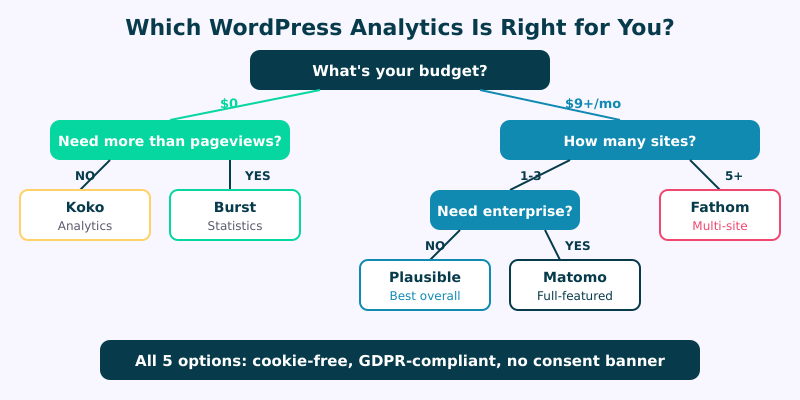
My general recommendations based on common scenarios:
- You want free and simple: Start with Koko Analytics. If you outgrow it, move to Burst Statistics.
- You want the best balance of features and simplicity: Plausible. It’s worth the $9/month.
- You need enterprise features or self-hosting: Matomo. Nothing else comes close for depth.
- You manage 5+ client sites: Fathom. The multi-site management pays for itself in time saved.
- You’re migrating from GA4: Plausible for simplicity, Matomo if you need feature parity. Either way, check out my migration guide.
Frequently Asked Questions
Do I need a cookie consent banner with privacy-first analytics?
In most cases, no. All five tools on this list can operate without setting cookies, which means they typically fall outside the scope of ePrivacy Directive (cookie law) requirements. However, I always recommend checking with a legal professional for your specific jurisdiction and use case. The GDPR applies to personal data processing regardless of cookies, but these tools are designed to avoid collecting personal data entirely.
Can privacy-first analytics track WooCommerce revenue?
Yes, but the depth varies. Plausible has built-in WooCommerce revenue tracking through its official WordPress plugin — it captures purchases, revenue amounts, and conversion rates automatically. Matomo offers the most comprehensive e-commerce tracking, including individual product performance, cart abandonment, and purchase funnels. Fathom can track purchase events through custom event setup, but it requires manual configuration. Burst Statistics has basic goal tracking that can be configured for purchases. Koko Analytics does not support e-commerce tracking.
Will switching from GA4 to privacy-first analytics hurt my SEO?
No. Google has confirmed repeatedly that using Google Analytics is not a ranking factor. Your SEO performance depends on content quality, technical health, backlinks, and user experience — not which analytics tool you use. In fact, switching to a lighter analytics script can slightly improve your page speed, which is an actual ranking factor. Plausible’s sub-1KB script versus GA4’s 45KB+ payload is a measurable difference in Core Web Vitals scores.
Can I use privacy-first analytics alongside Google Analytics during a transition?
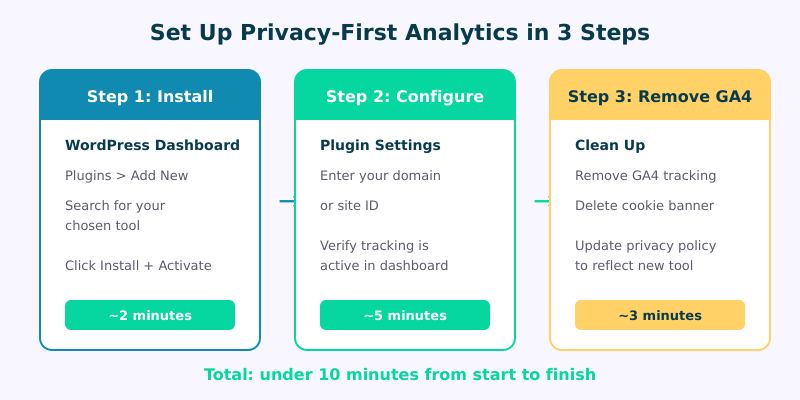
Absolutely, and I recommend it. Run both tools simultaneously for 30 to 60 days so you can verify that your new privacy-first tool captures data accurately and that your team adapts to the new dashboard. Just remember that running GA4 alongside still requires a cookie consent banner for GA4’s cookies — the privacy-first tool won’t need one, but GA4 will. Once you’re confident in the new tool, remove the GA4 tracking code and the consent banner can go with it.
Making the Switch
Privacy-first analytics isn’t a compromise anymore. In 2026, these tools offer everything most WordPress sites need — accurate traffic data, referral sources, top pages, conversion tracking, and search keyword insights — without the legal complexity, consent banners, and data concerns that come with traditional analytics.
The WordPress ecosystem makes this transition particularly easy. Every tool on this list has a dedicated WordPress plugin, and most take less than ten minutes to install and configure. If you’re still running GA4 with a cookie banner that 40% of your visitors reject, you’re not just creating privacy risk — you’re working with incomplete data.
Pick the tool that matches your needs and budget, install it today, and start getting cleaner, more accurate analytics by tomorrow. For a broader look at all your options beyond WordPress-specific tools, head over to my complete Google Analytics alternatives guide.