Last updated: February 2026
Google Analytics still powers over 55% of all websites — roughly 38 million sites worldwide. But that dominance is cracking. Cookie consent opt-in rates in Germany and France sit below 25%. The EU has issued EUR 6.7 billion in GDPR fines across 2,679 enforcement actions. And GA4’s 14-month data retention means you’re renting your analytics, not owning them.
I’ve guided dozens of organizations through this exact migration — from solo bloggers who finished in an afternoon to enterprise teams that needed three months of parallel tracking. The process is the same every time: six phases, zero data loss, and a simpler analytics setup on the other side.
This playbook gives you the complete migration roadmap. Whether you’re running a WordPress blog or a multi-property enterprise setup, you’ll walk away with a step-by-step plan to move from Google Analytics to a privacy-first alternative — without losing the metrics that matter.
Why Migrate Away from Google Analytics?
The case for leaving GA4 comes down to three taxes you’re paying — whether you realize it or not.
The consent tax. GA4 requires cookie consent in the EU, UK, and increasingly in US states. When the UK’s Information Commissioner’s Office (ICO) added a proper “Reject All” button, their reported traffic dropped 90.8% — from 119,417 users per day to 10,967. That’s not a traffic crash. It’s the gap between actual visitors and consented visitors. Our Consent Impact Dashboard can model this exact gap for your site. Cookie-free alternatives like Plausible and Fathom consistently track 5-11% more unique visitors than GA4 because they don’t need consent banners at all.
The complexity tax. Tasks that took two clicks in Universal Analytics now require six or more steps in GA4. The interface ships with just two acquisition reports compared to UA’s 25+ pre-built reports. 81% of GA4 migrators have faced custom event configuration issues. GA4 was designed for data engineers, not the marketers who actually need the data.
The ownership tax. GA4 keeps your detailed data for a maximum of 14 months, then deletes it automatically. BigQuery export only captures data from the day you enable it — no retroactive exports. Manual exports cap at 5,000 rows. And Google can cross-link your GA4 data with Google Ads for advertising profiles, raising legal risk under GDPR.
The regulatory pressure keeps building. New CCPA regulations effective January 1, 2026 mandate risk assessments, Global Privacy Control signal recognition, and one-click reject mechanisms. The EU-US Data Privacy Framework is at risk after the Privacy and Civil Liberties Oversight Board lost quorum in early 2025. France’s CNIL fined Google EUR 200 million in September 2025 for making cookie rejection harder than acceptance.
For a deeper dive into the compliance landscape, see our Complete Guide to Privacy-Compliant Web Analytics.
The 6-Phase Migration Roadmap
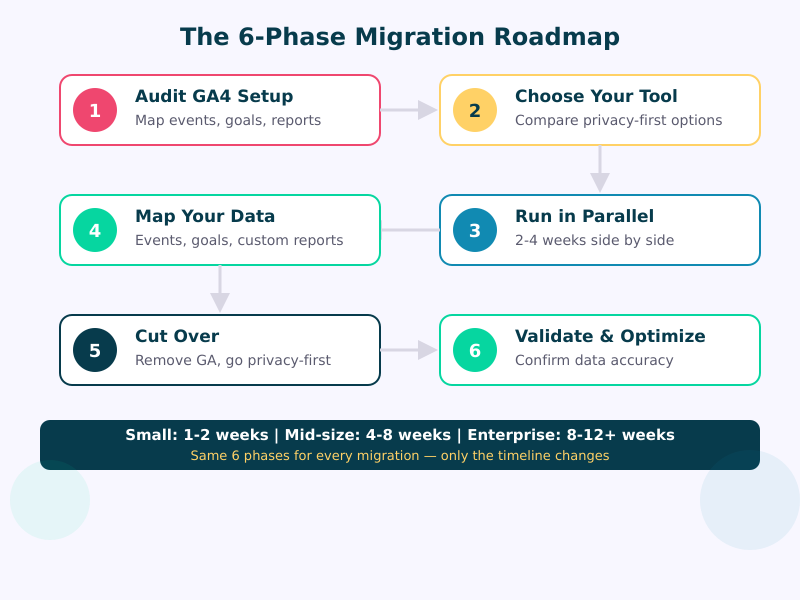
Every migration follows the same six phases — only the timeline changes. A personal blog can finish in a weekend. An enterprise with complex event architecture might need three months. But the steps are identical.
The key insight: you don’t need to migrate everything at once. Start with your most important metrics, validate them in the new tool, then progressively migrate the rest. Most teams discover they were only using 20% of GA4’s features anyway.
Phase 1: Audit Your GA4 Setup
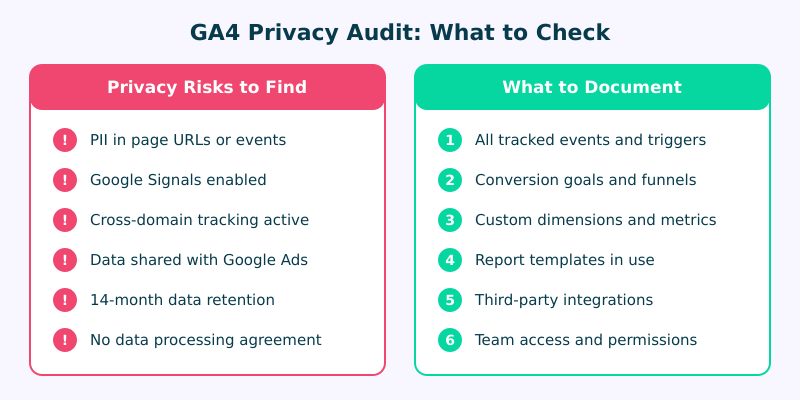
Before you touch a single tracking script, document what you have. I’ve seen teams skip this step and spend weeks trying to recreate reports they forgot about.
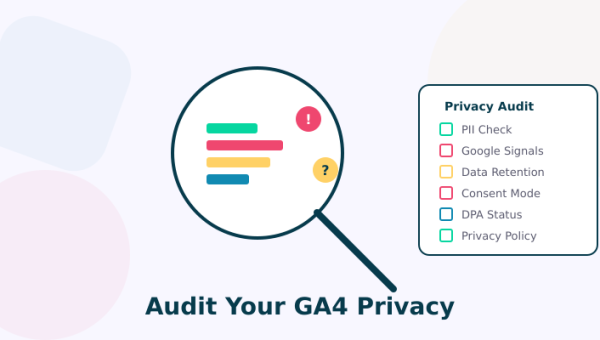
Privacy risks to flag:
- PII leaking through page URLs or event parameters (email addresses in query strings are more common than you’d think)
- Google Signals enabled — this allows cross-device tracking and feeds Google’s ad network
- Data shared with Google Ads through linked accounts
- Cross-domain tracking active without a valid legal basis
- No signed Data Processing Agreement (DPA) with Google
- Broken Consent Mode implementation — run your GTM code through our GTM Consent Audit to check
What to document:
- Every tracked event and its trigger conditions
- Conversion goals and funnel configurations
- Custom dimensions, metrics, and user properties
- Report templates your team actually uses (not the ones that exist — the ones people open)
- Third-party integrations (CRM, email marketing, ad platforms)
- Team access levels and who needs what data
Phase 2: Choose Your Privacy-First Tool
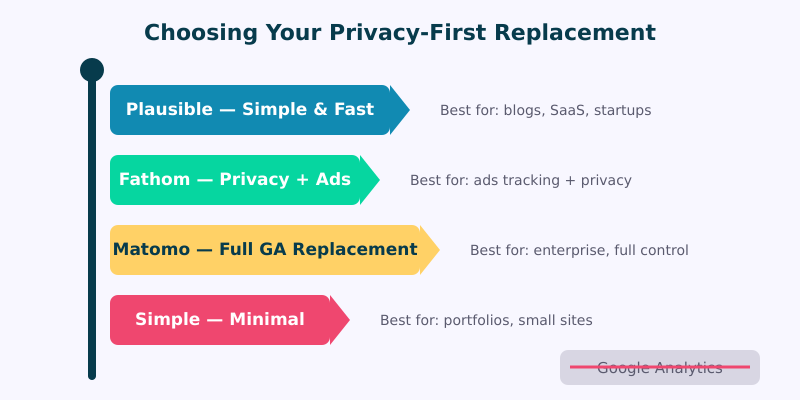
Your audit tells you what you need. Now match those needs to a privacy-first tool. Here’s how the leading options compare for migration specifically:
| Feature | Plausible | Fathom | Matomo | Simple Analytics |
|---|---|---|---|---|
| GA data import | Yes (UA + GA4) | Yes (UA + GA4) | Yes (via plugin) | No |
| Cookie-free | Yes | Yes | Optional mode | Yes |
| Self-host option | Community Edition | No | Full self-host | No |
| Data retention | Unlimited | Unlimited | Unlimited | Unlimited |
| Learning curve | ~20 minutes | ~20 minutes | ~2-3 hours | ~15 minutes |
| Best for | Blogs, SaaS, startups | Content sites, agencies | Enterprise, e-commerce | Portfolios, small sites |
| Starting price | $9/mo (10K views) | $15/mo (100K views) | Free (self-hosted) | $9/mo (100K views) |
My recommendation for most migrations: If you need historical GA data on your new dashboard, choose Plausible or Fathom — both offer one-click GA importers. If you need the closest feature parity to GA4 (funnels, heatmaps, session recordings), choose Matomo. If you want to start fresh with the simplest possible setup, choose Simple Analytics.
For detailed tool comparisons, see our Google Analytics Alternatives Buyer’s Guide and Plausible vs Fathom vs Matomo comparison.
Phase 3: Run in Parallel
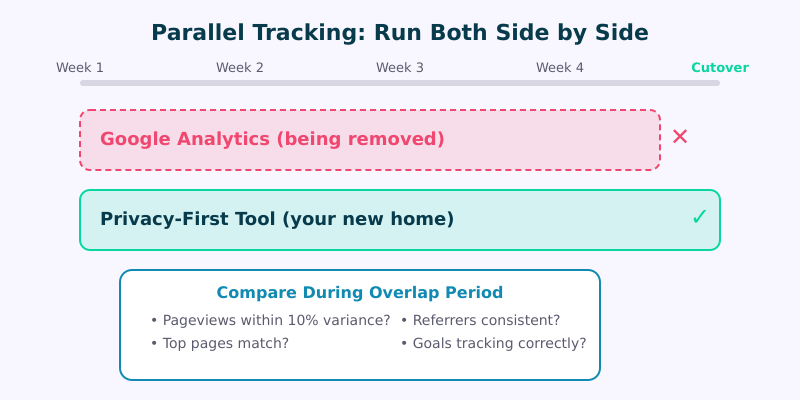
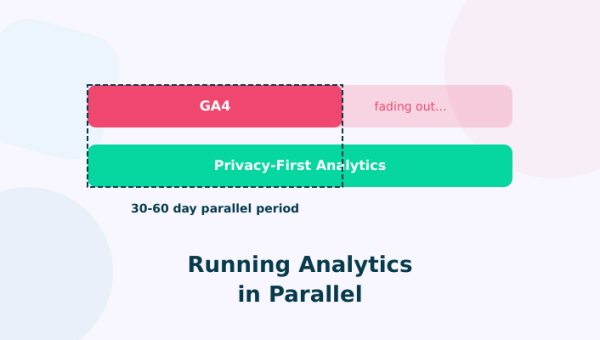
This is the phase most people skip — and the one that prevents stakeholder panic later. Install your new analytics tool alongside GA4. Don’t remove anything yet.
How long to run parallel:
- Small sites: 1-2 weeks is enough to confirm basic metrics match
- Mid-size businesses: 2-4 weeks to validate conversions and referrer data
- Enterprise: 1-3 months, especially if you need executive buy-in with comparative data
What to compare during overlap:
- Pageviews — expect 5-15% variance. Cookie-free tools typically show higher numbers because they’re not blocked by ad blockers or rejected by consent banners.
- Top pages — the ranking should be nearly identical, even if absolute numbers differ.
- Referrer sources — direct/organic/social breakdown should match within 10%.
- Conversion goals — test every goal individually. This is where configuration errors hide.
Don’t expect identical numbers. GA4 and cookie-free tools use fundamentally different tracking models. GA4 uses cookies to stitch sessions across visits. Privacy-first tools count unique visitors per day without persistent identifiers. The numbers will differ — and that’s expected.
Phase 4: Map Your Data
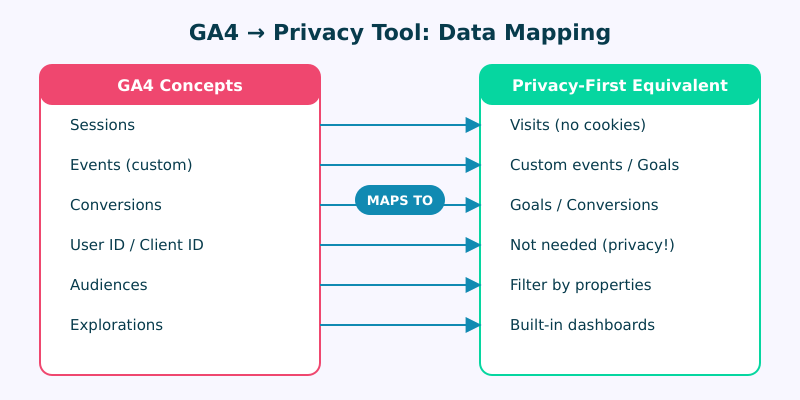
GA4 concepts don’t map 1:1 to privacy-first tools — and that’s a feature, not a bug. Most GA4 concepts exist to support advertising use cases you might not need.
Key mapping differences:
Sessions → Visits. GA4 uses cookies to define sessions with complex rules (30-minute timeout, campaign change resets). Privacy-first tools count visits based on page loads without cookies. You’ll see different session counts — but your engagement trends will match.
User ID → Not needed. GA4’s User ID and Client ID exist for cross-device tracking and audience building. Cookie-free tools don’t track individuals at all. If you need user-level analytics, consider a product analytics tool like PostHog alongside your web analytics.
Audiences → Filters. GA4 audiences are built for remarketing. Privacy-first tools let you filter by properties (country, device, UTM source) to get the same analytical value without the tracking overhead.
Explorations → Built-in dashboards. GA4’s Explorations feature was introduced because the standard reports were too limited. Privacy-first tools provide a single, comprehensive dashboard that covers what most teams need.
What about historical data? If preserving trend continuity matters to your team, import your GA history before adding the new tracking code:
- Plausible: Settings → Import from Google Analytics (supports UA + GA4)
- Fathom: Built-in importer, unlimited historical data, preserved forever
- Matomo: Google Analytics Importer plugin — import BEFORE adding Matomo tracking code
Phase 5: Cut Over
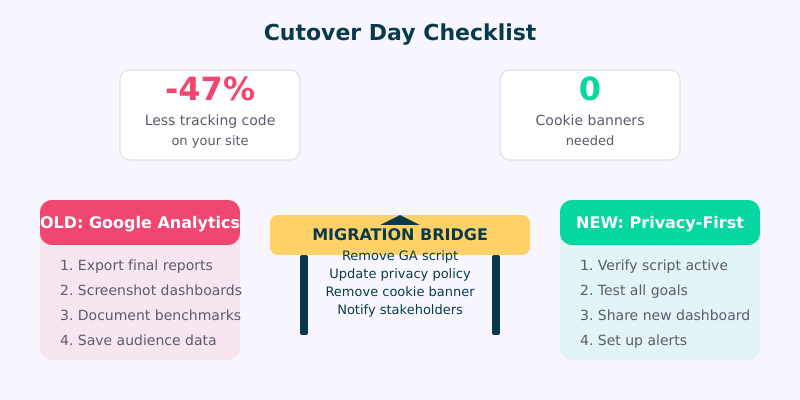
Cutover day is simpler than it sounds. You’ve already validated the new tool during parallel tracking. Now you’re just cleaning up.
Before removing GA4:
- Export final reports. Screenshot key dashboards and export any data you want to keep. Remember: BigQuery only captures data from the day export was enabled.
- Document your benchmarks. Save your current traffic, conversion, and engagement baselines. You’ll reference these when validating the new tool.
- Notify stakeholders. Send a brief email: “Starting [date], our analytics dashboard moves to [tool]. Here’s the link. Here’s a 5-minute video walkthrough.”
The cutover itself:
- Remove the GA4 tracking script from your site (check GTM, theme files, and plugins)
- Remove the cookie consent banner — if GA4 was the only reason you needed one, it’s gone
- Update your privacy policy to reflect the new analytics tool
- Verify the new tool is collecting data by checking real-time stats
The result? Less tracking code on your site, zero cookie banners (if using a cookie-free tool), and a privacy policy that’s actually honest about what you collect.
Phase 6: Validate and Optimize
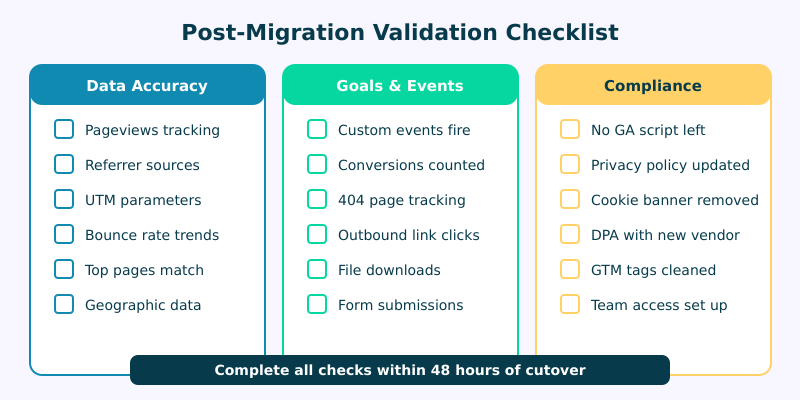
Give yourself 48 hours after cutover, then run through this validation checklist:
Data accuracy:
- Pageviews tracking on all key pages (check at least your top 10)
- Referrer sources showing correctly (organic, social, direct)
- UTM parameters passing through from campaigns (use a UTM link builder to ensure consistent tagging)
- Geographic data roughly matching your expected audience
Goals and events:
- Every custom event fires correctly (test each one manually)
- Conversions counting accurately
- 404 page tracking active
- Outbound link clicks and file downloads recording
Compliance:
- No GA4 script remnants on any page (use your browser’s developer tools to check network requests)
- Privacy policy reflects the new tool
- Cookie banner removed (if applicable)
- Data Processing Agreement signed with new vendor
- GTM container cleaned of orphaned GA4 tags
5 Migration Pitfalls to Avoid
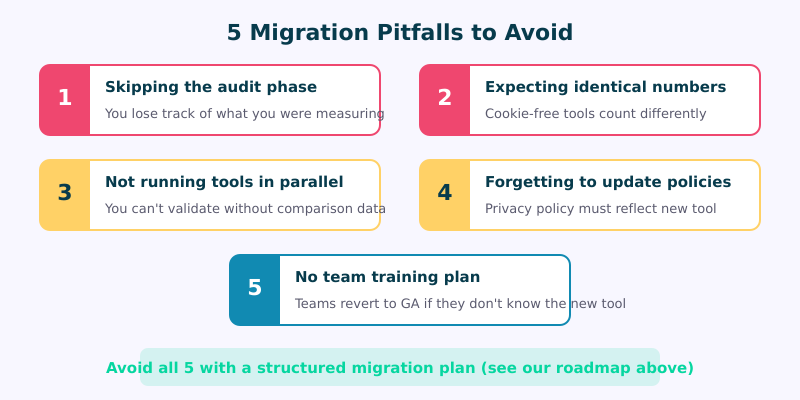
After helping organizations migrate, these are the mistakes I see repeatedly:
1. Skipping the audit. You can’t migrate what you haven’t documented. Teams that skip Phase 1 spend weeks recreating reports from memory — and always miss something.
2. Expecting identical numbers. GA4 and cookie-free tools measure traffic differently. A 10-15% variance in pageviews is normal. What matters is that trends match: if GA4 shows a 20% traffic increase this week, your new tool should show something similar.
3. Not running tools in parallel. The parallel phase builds stakeholder confidence. Without it, the first time someone sees different numbers, they’ll push to revert to GA4.
4. Forgetting to update privacy policies. Your privacy policy must accurately describe your data collection practices. Swapping analytics tools without updating the policy creates a compliance gap.
5. No team training plan. Even simple tools need introduction. If your marketing team doesn’t know how to find their metrics in the new dashboard, they’ll lobby to go back to GA4. A 20-minute walkthrough prevents this entirely.
Timeline by Organization Size
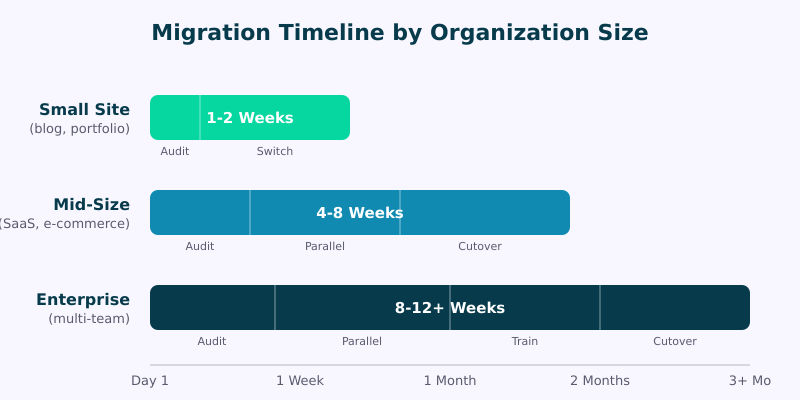
| Organization | Timeline | Key Activities |
|---|---|---|
| Small site (blog, portfolio) | 1-2 weeks | Quick audit, install script, brief parallel check, switch |
| Mid-size (SaaS, e-commerce) | 4-8 weeks | Full audit, tool evaluation, 2-4 week parallel, team training, cutover |
| Enterprise (multi-team) | 8-12+ weeks | Detailed audit, stakeholder alignment, 1-3 month parallel, phased rollout, training program |
What determines your timeline? Not your traffic volume — your complexity. A site with 10 million pageviews but simple tracking (pageviews + 3 goals) can migrate in a week. A site with 100,000 pageviews but 50 custom events, CRM integrations, and 15 stakeholders might need two months.
What’s Coming Next
The regulatory landscape keeps pushing toward privacy-first analytics. The EU’s Digital Omnibus Package (proposed November 2025) would create a new legal exception for aggregated audience measurement without consent — essentially validating the approach privacy-first tools already use.
New CCPA regulations effective January 2026 mandate Global Privacy Control signal recognition and one-click reject mechanisms, making GA4’s consent requirements even more burdensome in the US market.
For organizations still on GA4, the window to migrate proactively (rather than reactively under regulatory pressure) is narrowing. For a forward look at where analytics is headed, see our Future of Web Analytics guide.
FAQ
Will I lose my historical data when migrating from GA4?
Not if you plan ahead. Plausible, Fathom, and Matomo all support importing GA historical data. Fathom preserves imported data forever with no deletion. Export from GA4 before migrating — BigQuery exports only capture data from the day you enable them, not retroactively.
How much do privacy-first analytics tools cost compared to GA4?
GA4 is free, but the real cost includes consent management platforms ($50-500/month), developer time maintaining cookie banners, and data loss from consent rejection (40-70% in EU markets). Privacy-first tools start at $9/month and eliminate all three hidden costs.
Can I migrate from GA4 without any downtime in analytics tracking?
Yes. Run both tools in parallel during the migration. Install the new analytics script alongside GA4, validate data for 2-4 weeks, then remove GA4. You’ll have continuous tracking throughout the entire process.
Do privacy-first analytics tools track fewer metrics than GA4?
They track fewer data points by design — that’s what makes them privacy-compliant. But they cover what 80% of teams actually use: pageviews, referrers, top pages, conversions, UTM campaigns, and geographic data. The 20% they skip is mostly advertising-related tracking you may not need.
What happens to my Google Ads integration after migrating?
GA4’s integration with Google Ads is one-directional — it sends audience data to Ads for remarketing. Privacy-first tools don’t offer this integration because it requires tracking individuals. You can still run Google Ads effectively using UTM parameters for campaign tracking and Google Ads’ own conversion tracking pixel.
Is Matomo really a full replacement for GA4?
Matomo is the closest feature-for-feature replacement. It offers funnels, heatmaps, session recordings, A/B testing, and a GA-style interface familiar to UA veterans. The self-hosted version gives you 100% data ownership. CNIL (France’s data authority) explicitly recognizes Matomo as a privacy-compliant analytics solution.
How accurate are privacy-first tools compared to GA4?
Counter-intuitively, privacy-first tools often track MORE visitors — Fathom reports 11% more unique visitors than GA4 on the same site. This happens because cookie-free scripts aren’t blocked by ad blockers or rejected by consent banners. You’re seeing closer to 100% of your actual traffic.