I’ve been consulting on analytics setups since before GDPR took effect in May 2018, and if there’s one thing I hear more than anything else, it’s this: “We know we’re supposed to be compliant, but we have no idea what that actually means for our analytics.” You’re not alone. Between the legal jargon, conflicting advice from vendors, and a steady drumbeat of enforcement actions — EUR 6.7 billion in fines across 2,679 actions as of December 2025 — it’s no wonder analytics teams feel paralyzed. This guide is my attempt to cut through the noise and give you a clear, step-by-step path to GDPR-compliant analytics. No legalese, no scare tactics, just practical steps you can take this week. This article is part of my Complete Guide to Privacy-Compliant Analytics, where I cover the full landscape in detail.
What GDPR Actually Requires for Analytics
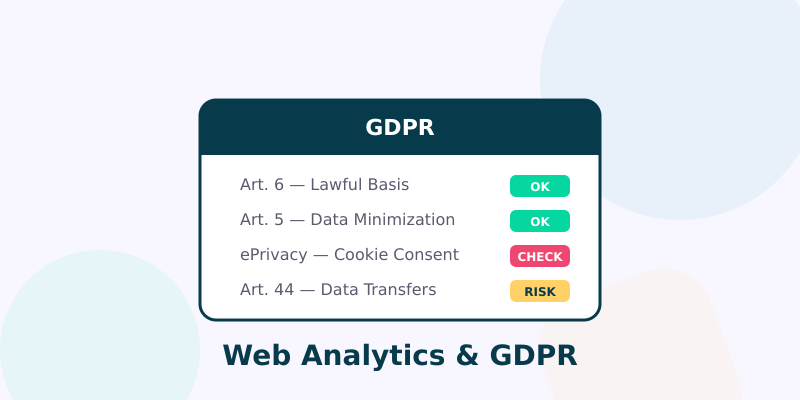
Let’s start with what the regulation actually says, stripped of the legal bloat. GDPR doesn’t ban analytics. It doesn’t even ban cookies. What it requires is that you have a lawful basis for processing personal data, that you practice data minimization, and that you’re transparent with your visitors about what you collect and why.
For analytics specifically, three GDPR principles matter most:
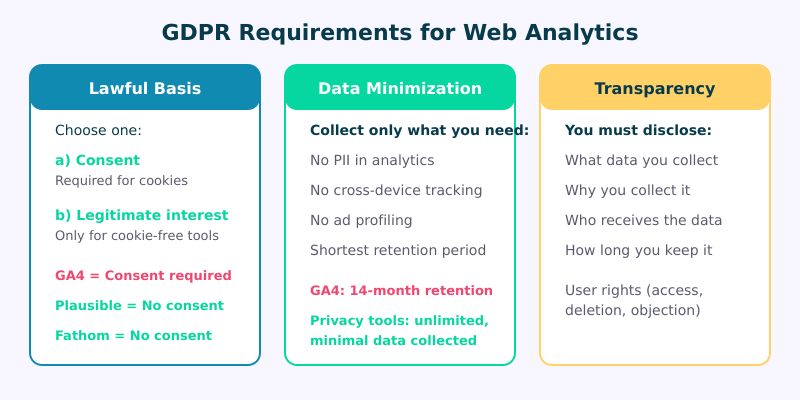
- Lawful basis (Article 6): You need a legal reason to process personal data. For analytics, this is usually either consent or legitimate interest — more on that distinction in a moment.
- Data minimization (Article 5(1)(c)): Collect only what you need. If you just want to know which pages are popular and where traffic comes from, you don’t need to track individual user journeys across sessions.
- Transparency (Articles 13-14): Tell people what you collect, why, how long you keep it, and who you share it with. This means a real privacy policy, not a copy-pasted template from 2016.
Here’s what trips people up: GDPR applies to personal data, and IP addresses count as personal data under European law. So even “anonymous” analytics that log full IP addresses are processing personal data. The question isn’t whether GDPR applies to your analytics — it almost certainly does. The question is which compliance path makes sense for your setup.
Do You Need Cookie Consent for Analytics?
This is the million-euro question, and the answer is: it depends on your analytics tool, not on GDPR itself.
GDPR governs personal data processing. But the ePrivacy Directive (often called the “cookie law”) is a separate regulation that requires consent for storing or accessing information on a user’s device — which includes cookies, local storage, and similar technologies. The two regulations overlap, and the stricter rule wins.
Here’s the practical breakdown:
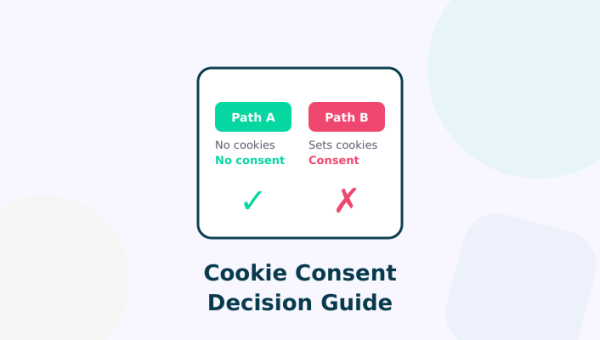
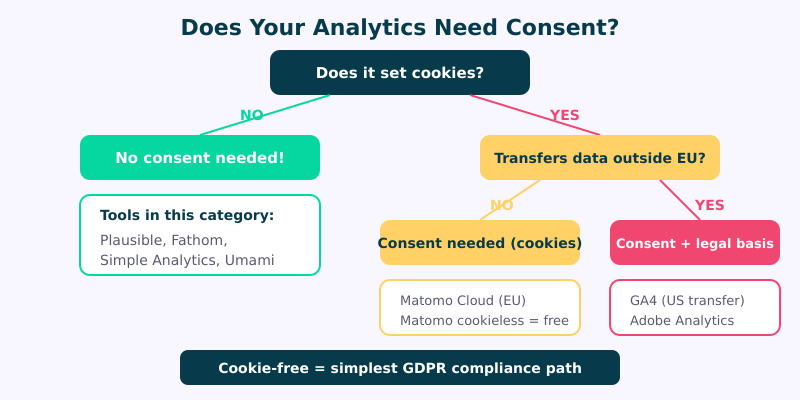
- If your analytics tool sets cookies (like GA4 does with
_ga,_ga_*, and_gid), you need consent under the ePrivacy Directive. Period. The cookie isn’t “essential” to deliver the service your visitor requested, so it’s non-essential, and non-essential cookies require opt-in consent. - If your analytics tool is truly cookie-free — no cookies, no local storage, no fingerprinting — then the ePrivacy Directive doesn’t apply to the storage question. You still need a lawful basis under GDPR for any personal data you process, but if the tool also minimizes data collection (no IP logging, no cross-site tracking), you can often operate under legitimate interest without a consent banner.
This distinction is why tools like Plausible, Fathom, and Simple Analytics have become so popular. They’re engineered from the ground up to avoid cookies and minimize personal data, which means they sidestep the consent requirement entirely. I switched three of my own client sites to Plausible in 2023, and we were able to remove the consent banner on all three without any compliance concerns. Traffic data actually became more accurate because we were no longer losing 30-40% of visitors who declined the cookie prompt.
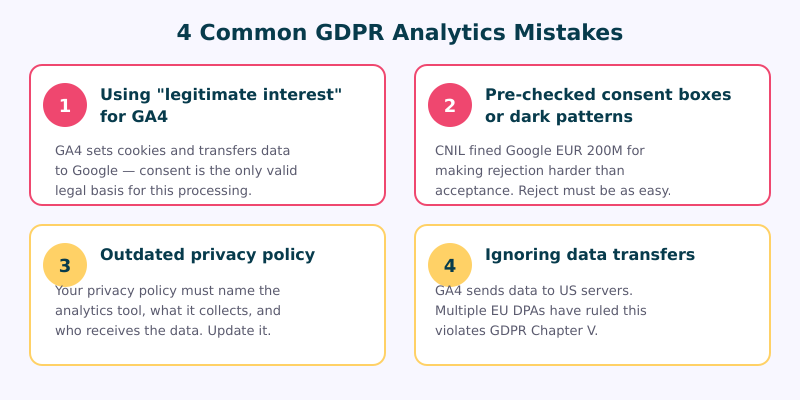
In September 2025, CNIL — France’s data protection authority — fined Google EUR 200 million for deceptive consent mechanisms tied to its analytics and advertising products. The ruling reinforced that consent must be freely given, specific, informed, and unambiguous. Dark patterns, pre-checked boxes, and “accept all” buttons that are visually more prominent than “reject all” don’t cut it.
The Legitimate Interest Argument
Legitimate interest is one of six lawful bases under GDPR Article 6, and it’s the one analytics teams love to reach for because it doesn’t require consent. But it’s not a free pass.
To use legitimate interest, you need to pass a three-part balancing test:
- Purpose test: Do you have a genuine, specific interest? “Understanding how visitors use our website to improve it” qualifies.
- Necessity test: Is the data processing necessary for that purpose? This is where GA4 starts to fail — you don’t need cross-site tracking, persistent cookies, or data transfers to a US tech giant to count pageviews.
- Balancing test: Do your interests override the individual’s rights and freedoms? When you’re sending data to Google’s infrastructure, where it gets combined with data from millions of other sites, the balance tips against you.
Here’s the bottom line: legitimate interest is not a valid basis for GA4. Multiple European DPAs have confirmed this, and the Austrian, French, and Italian authorities have all issued rulings against GA4 specifically. The combination of cookies, cross-site identifiers, and US data transfers makes the balancing test essentially impossible to pass.
However, legitimate interest is a valid basis for cookie-free, privacy-first analytics tools. France’s CNIL has explicitly recognized that Matomo in cookieless mode can operate without consent. The logic extends to other cookie-free tools: if you’re not storing anything on the device and you’re minimizing personal data, legitimate interest holds up because the privacy impact is genuinely low.
Step 1 — Audit Your Current Setup
Before you change anything, you need to know what you’re actually collecting. I’ve walked into client engagements where the marketing team swore they only had “basic analytics” and we found seven different tracking scripts on the page.
Here’s your audit checklist:
- Scan for tracking scripts. Open your site in Chrome DevTools, go to the Network tab, reload the page, and filter by “script.” Look for any requests to analytics providers, ad networks, or third-party services. Also check for tag managers — a single Google Tag Manager container can hide dozens of tracking pixels.
- Check cookies. In DevTools, go to Application → Cookies. Document every cookie: name, domain, expiration, and purpose. If you can’t explain what a cookie does, that’s a red flag.
- Review data flows. Where does your analytics data go? Is it processed in the EU or transferred to the US? Who has access? Is it shared with any third parties?
- Map personal data. Identify every piece of personal data your analytics collects: IP addresses, user IDs, device fingerprints, location data. Remember, even pseudonymized data is still personal data under GDPR.
- Check your consent mechanism. If you have a cookie banner, test it. Does analytics fire before consent is given? I see this mistake constantly — the consent banner loads, but GA4 has already sent a pageview event. That’s a violation.
Document everything you find. You’ll need this inventory for the next steps and for your privacy documentation.
Step 2 — Choose a Compliant Analytics Approach
Based on your audit, you have three viable paths forward. Each has trade-offs, and the right choice depends on what data you actually need.
Approach A: Cookie-Free Analytics (Simplest)
Switch to a privacy-first tool like Plausible, Fathom, or Simple Analytics. These tools don’t set cookies, don’t collect personal data beyond what’s minimally necessary, and process data in the EU. No consent banner needed. No legitimate interest assessment needed (though having one documented doesn’t hurt). You get clean, accurate traffic data — pageviews, referrers, device types, country-level location — without any compliance headaches. These tools also support UTM-based campaign tracking, so you don’t sacrifice marketing attribution. I’ve written a full comparison in my Google Analytics Alternatives guide.
Approach B: Cookieless Mode (Middle Ground)
If you need more detailed analytics than cookie-free tools provide, consider Matomo in cookieless mode. You self-host the data (EU processing by default), disable cookies, and get session-level analytics without triggering the ePrivacy consent requirement. CNIL has explicitly confirmed this approach is consent-free. The trade-off: you lose multi-session visitor recognition, so metrics like returning visitors and multi-visit conversion paths won’t work.
Approach C: Consent-Based Analytics (Most Complex)
If you genuinely need GA4-level tracking — cross-session user journeys, integration with Google Ads, audience building — then you need proper, GDPR-compliant consent. This means a consent management platform (CMP) that blocks all analytics cookies until the visitor actively opts in. Expect to lose 30-60% of your traffic data to consent rejection, depending on your audience and how you design the prompt — use our Consent Impact Dashboard to calculate the exact cost. Make sure your CMP meets the IAB TCF 2.2 standard if you’re in the ad tech ecosystem.
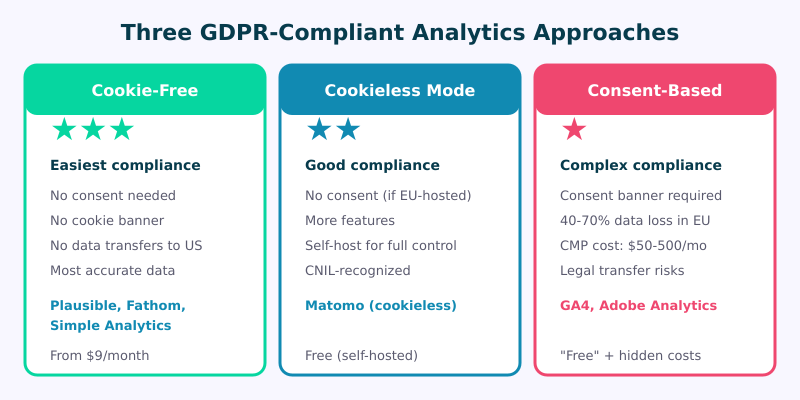
For most websites I work with, Approach A is the obvious winner. You get the data you need with zero compliance overhead. If you’re ready to make the switch, my migration guide walks you through it step by step.
Step 3 — Update Your Privacy Documentation
Whichever approach you choose, your privacy policy needs to reflect reality. Here’s what to include for your analytics section:
- What you collect: Be specific. “We collect anonymized usage data including pages visited, referral source, browser type, and country-level location” is better than “We use analytics to improve our services.”
- Your lawful basis: State whether you rely on consent or legitimate interest, and explain why.
- Your analytics provider: Name them. Link to their privacy policy and DPA.
- Data location: Where is the data processed and stored? EU, US, or somewhere else?
- Retention period: How long do you keep the data? Plausible retains aggregated data indefinitely but never stores personal data. GA4 defaults to 14 months for user-level data. State what applies to you.
- Third-party sharing: Does your analytics provider use the data for their own purposes? With cookie-free tools, the answer is no. With GA4, the answer is complicated.
If you use legitimate interest, you should also maintain a Legitimate Interest Assessment (LIA) document. It doesn’t need to be published, but it should be ready for a DPA audit. Include the three-part balancing test and your reasoning.
Step 4 — Implement Consent Where Required
If you’re going with Approach C (consent-based analytics), here’s how to implement it properly:
- Use a real CMP. Cookiebot, Usercentrics, and OneTrust are popular options that handle the technical side — blocking scripts until consent is granted. Don’t try to build this yourself.
- Require affirmative action. The consent prompt must require the visitor to actively opt in. Pre-checked boxes, implied consent (“by continuing to browse…”), and cookie walls (blocking content until consent is given) are all invalid under GDPR.
- Make rejection equally easy. The “reject” or “necessary only” option must be as prominent and easy to reach as “accept all.” This is specifically what CNIL’s EUR 200M fine against Google targeted.
- Block scripts before consent. Analytics scripts must not fire a single request until consent is recorded. Use your CMP’s blocking functionality or Google’s consent mode (which defers data collection until consent is granted).
- Record and store consent. You need to prove that consent was given — who, when, what they agreed to, and what version of your consent text was shown. Your CMP handles this, but verify it’s working.
- Allow easy withdrawal. Visitors must be able to change their mind at any time. Include a “manage cookies” link in your footer that reopens the consent prompt.
Test thoroughly after implementation. Load the page in an incognito window, decline consent, and verify that no analytics requests appear in the Network tab. You’d be surprised how many CMPs “block” analytics visually but still fire the tracking script underneath. For a systematic check, run your GTM code through our GTM Consent Initialization Audit — it catches the ten most common Consent Mode v2 errors automatically.
Common Mistakes to Avoid
After auditing hundreds of sites over the years, I see the same mistakes on repeat:
- The “consent banner as decoration” mistake. You install a cookie banner, but GA4 fires on page load regardless of the visitor’s choice. The banner makes you feel compliant, but you’re violating both GDPR and the ePrivacy Directive. Always verify with DevTools that scripts actually respect the consent signal.
- The “we anonymize IPs” defense. GA4’s IP anonymization doesn’t help. First, the data still reaches Google’s US servers before anonymization occurs. Second, GA4 collects enough other identifiers (client ID, session data, device characteristics) that the data is still personal even without the IP.
- The “our legal team said legitimate interest is fine” shortcut. I’ve seen this with GA4 specifically — legal teams who haven’t kept up with DPA enforcement assume legitimate interest covers standard analytics. It doesn’t, not when the tool sets cookies and transfers data to the US. Multiple DPAs have ruled explicitly on this point.
- The “we’ll deal with it when we get a complaint” gamble. GDPR enforcement has moved past the warning phase. DPAs are issuing fines, and they don’t always wait for complaints. The Austrian DPA’s landmark ruling against GA4 originated from a complaint by noyb, but subsequent investigations in France and Italy were self-initiated by the regulators.
FAQ
Is Google Analytics illegal under GDPR?
GA4 isn’t illegal per se, but using it without proper consent is a GDPR violation. Multiple European data protection authorities — including those in Austria, France, and Italy — have ruled that GA4 as typically implemented violates GDPR due to cookie usage and US data transfers. You can still use GA4 legally, but only with a properly implemented consent mechanism that blocks all tracking until the visitor opts in.
Can I use analytics without a cookie banner?
Yes, if your analytics tool doesn’t set cookies or store any data on the visitor’s device. Cookie-free tools like Plausible, Fathom, and Simple Analytics are designed specifically for this. Matomo in cookieless mode also qualifies. CNIL has explicitly confirmed that these approaches don’t require consent. You still need to mention analytics in your privacy policy, but you can skip the banner entirely.
What happens if I get a GDPR complaint about my analytics?
If a visitor files a complaint with their local DPA, the authority will investigate. They’ll look at your website, check what cookies are set, review your consent mechanism (if any), and examine your privacy policy. If they find a violation, the process varies by country — you might get a warning, an order to change your practices, or a fine. The size of the fine depends on the severity: for a small business with a misconfigured cookie banner, it might be a few thousand euros. For systematic violations by larger organizations, it can run into millions. The best defense is straightforward compliance before a complaint arrives.
How do I handle analytics for visitors from different countries?
GDPR applies to all visitors from the EU/EEA, regardless of where your business is based. If you serve a global audience, the simplest approach is to apply GDPR standards universally — use a cookie-free analytics tool for everyone. Alternatively, you can use geo-targeting to show consent prompts only to EU visitors, but this adds complexity and the risk of misidentifying someone’s location. Our Consent Logic Planner maps out exactly which consent types each region requires for each tracking technology. In my experience, applying the strictest standard globally is both easier to implement and easier to maintain. If you need to draft the actual banner text, our Consent Banner Generator covers six major regulations.
GDPR compliance for analytics doesn’t have to be the bureaucratic nightmare it’s made out to be. The simplest path — switching to a cookie-free analytics tool — takes an afternoon and eliminates consent requirements entirely. Even if you need to stick with consent-based tracking, the steps above give you a clear framework. Start with the audit, choose your approach, update your documentation, and test everything. Your future self (and your legal team) will thank you.