If you’ve spent more than five minutes reading about GDPR, you’ve probably encountered this question: do I need a cookie consent banner for my analytics? The answer gets buried under layers of legal jargon, conflicting blog posts, and vendor marketing. But here’s the thing — the decision is actually straightforward once you understand one core principle.
The requirement for consent isn’t really about analytics. It’s about whether your tool stores anything on your visitor’s device. That’s it. That’s the test.
I’ve helped dozens of clients untangle their consent obligations over the past twelve years, and the conversation almost always follows the same three paths. This guide walks you through each one so you can figure out exactly where your setup lands — and what you need to do about it. If you’re looking for broader context, start with my complete guide to privacy-compliant analytics, which covers the full landscape.
The Simple Test: Does Your Tool Set Cookies?
Every consent decision starts with a single question: does your analytics tool place cookies (or any other data) on the visitor’s browser?
This matters because the ePrivacy Directive, Article 5(3) — sometimes called the “cookie law” — requires informed consent before storing or accessing information on a user’s device. Notice that the directive doesn’t mention the word “cookie” specifically. It covers any form of device storage: cookies, localStorage, fingerprinting data, anything.
The GDPR then layers on top of this. If your tool processes personal data (like IP addresses or user identifiers), you need a legal basis under GDPR Article 6. For most analytics cookies, the only realistic legal basis is consent — legitimate interest rarely holds up for tracking cookies, especially after the Planet49 CJEU ruling confirmed that pre-ticked consent boxes don’t count.
So the flowchart looks like this:
- Does the tool store anything on the visitor’s device? If no → you likely don’t need consent for analytics.
- If yes, is the storage strictly necessary for the service? If yes → consent may not be required (but analytics cookies are almost never “strictly necessary”).
- If it stores non-essential data → you need consent. Full stop.
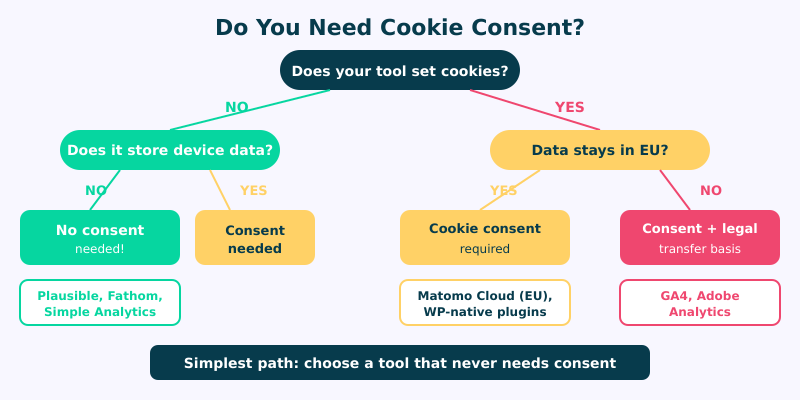
Let me walk you through what each path looks like in practice.
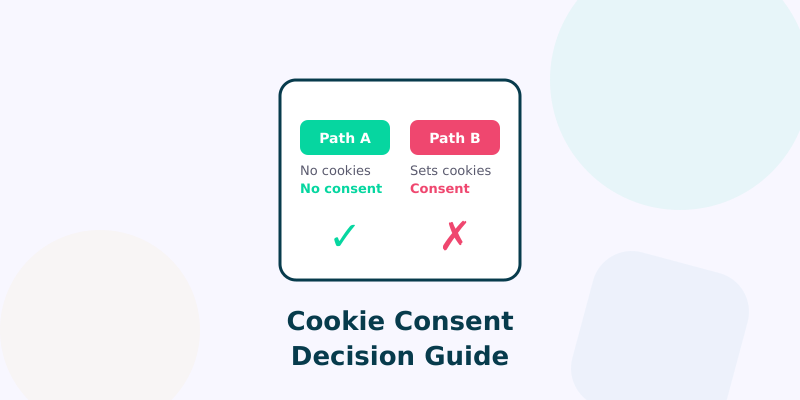
Path A — No Cookies, No Problem
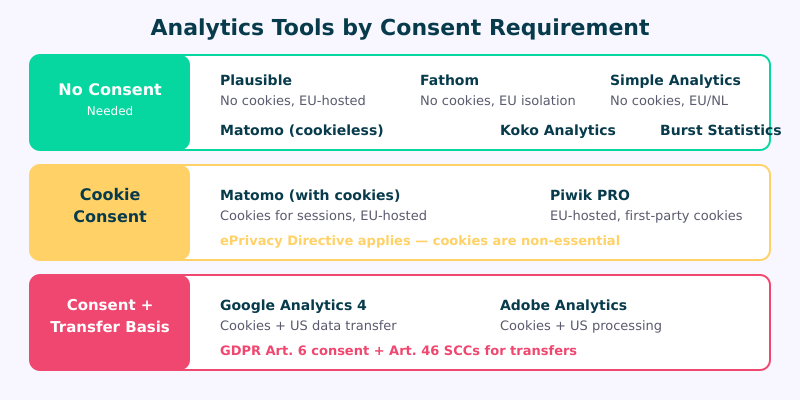
This is the cleanest path, and it’s where most privacy-focused analytics tools sit. If your tool doesn’t set cookies and doesn’t store any identifiers on the visitor’s device, the ePrivacy Directive’s consent requirement simply doesn’t apply to the analytics portion of your site.
Tools in this category include:
- Plausible Analytics — no cookies, no persistent identifiers, all data stays in the EU. Fully cookieless by design.
- Fathom Analytics — uses an intelligent routing system to avoid cookies entirely. Processes data in compliance with EU regulations.
- Simple Analytics — doesn’t use cookies or collect personal data. Servers in the Netherlands.
- Matomo in cookieless mode — this is an important distinction. Matomo can set cookies, but when configured in cookieless mode, it uses a combination of daily-rotating hashes that don’t persist on the visitor’s device. France’s data protection authority (CNIL) has specifically recognized this configuration as exempt from consent requirements.
If you’re using any of these tools in their default (or cookieless) configuration, you can skip the consent banner for analytics. You still might need one if other parts of your site set cookies — advertising pixels, embedded videos, chat widgets — but the analytics piece is covered.
I’ve written a detailed comparison of these tools in my Google Analytics alternatives roundup if you want to evaluate them side by side.
Path B — Cookies but EU-Hosted
What if your analytics tool sets cookies but keeps all data within the EU? This is where things get nuanced.
You still need consent for the cookies themselves — the ePrivacy Directive doesn’t care where your servers are. If something is stored on the user’s device and it’s not strictly necessary for the service they requested, consent is required. Server location doesn’t change that.
However, EU hosting does simplify your GDPR compliance significantly. You won’t need to worry about international data transfer mechanisms like Standard Contractual Clauses (SCCs) or adequacy decisions. Your Data Processing Agreement is more straightforward. And your risk profile during a regulatory audit is much lower.
Self-hosted Matomo (with cookies enabled) falls into this category. So does Piwik PRO when deployed on EU infrastructure. You need the consent banner, but the rest of your compliance stack is simpler.
My recommendation for this path: if you’re already going to show a consent banner, make sure it’s implemented correctly. That means no pre-ticked boxes (Planet49 made this crystal clear), no “legitimate interest” toggles for analytics cookies, and a genuine option to decline without being nagged. Our Consent Banner Generator can help you draft compliant copy for six major regulations, and the GTM Consent Audit will verify your Consent Mode implementation is firing correctly.
Path C — Cookies and US Data Transfer
This is the most complex path, and it’s where Google Analytics 4 sits. GA4 sets several cookies on your visitors’ devices:
- _ga — a client ID cookie that lasts up to two years
- _ga_* — a session-specific cookie tied to your measurement ID
- _gid — a 24-hour cookie for session distinction
Each of these triggers the ePrivacy consent requirement. But GA4 adds another layer of complexity: data transfer. Even with Google’s EU data residency options, behavioral data can still be accessed by US-based personnel for support and engineering purposes. This means you need to address both the cookie consent question and the international transfer question.
For this path, you need:
- A compliant consent banner that blocks GA4 scripts until the visitor actively opts in.
- A valid data transfer mechanism — currently the EU-US Data Privacy Framework for companies on the DPF list, or SCCs as a fallback.
- A thorough entry in your privacy policy covering both the cookies and the transfer.
- Google Consent Mode v2 properly configured to respect the visitor’s choice.
The practical impact? You’ll lose visibility into a significant chunk of your traffic. Consent rates in the EU typically range from 30% to 70%, depending on your banner design and audience. That means your GA4 data represents, at best, a biased sample of your actual visitors. Use our Consent Impact Dashboard to model exactly how much data you’re losing. I go deeper into this in my GDPR web analytics compliance guide.
What About Server-Side Analytics?
Server-side analytics is often presented as a magic workaround for consent requirements. The logic goes: if analytics runs on the server, nothing touches the visitor’s device, so no consent is needed. That’s partially true — but only partially.
Pure server-side log analysis (parsing your Nginx or Apache access logs) doesn’t set cookies and doesn’t store anything on the device. Tools like GoAccess or AWStats that work purely from server logs genuinely don’t require consent.
But here’s the catch. Many “server-side” implementations aren’t purely server-side. Server-side Google Tag Manager, for example, still requires a client-side tag to send data to your server container — and that client-side component can still set cookies. You’ve moved the processing server-side, but you haven’t eliminated the device storage.
The test remains the same: is anything being stored on or read from the visitor’s device? If your server-side setup truly operates without any client-side footprint — no cookies, no JavaScript, just log parsing — then you’re in Path A territory. If it still needs a client-side component that stores data, you’re in Path B or C.
How to Check If Your Tool Sets Cookies
You don’t have to take your vendor’s word for it. Here’s how to verify cookie behavior yourself in under two minutes.
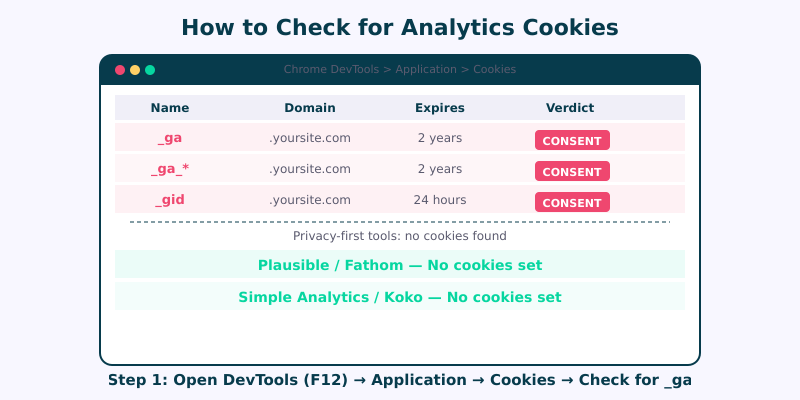
Using Chrome DevTools:
- Open your site in Chrome. Right-click anywhere and select “Inspect” (or press F12).
- Go to the Application tab.
- In the left sidebar, expand Storage → Cookies and click on your domain.
- Clear all cookies (right-click → “Clear”), then reload the page.
- Check what cookies appear. Look for anything from your analytics tool — names like
_ga,_pk_id,_hj, or similar.
Using Firefox:
- Open DevTools (F12), go to the Storage tab.
- Expand Cookies and check your domain after a fresh page load.
While you’re there, also check Local Storage and Session Storage. Some tools avoid cookies but stash identifiers in localStorage instead — which still counts as device storage under the ePrivacy Directive.
Do this check in a private/incognito window to avoid interference from browser extensions. And do it without interacting with any consent banner first — you want to see what fires before consent is given.
FAQ
Do I need cookie consent if I only use Plausible Analytics?
No. Plausible doesn’t set cookies or store any data on the visitor’s device, so the ePrivacy Directive’s consent requirement doesn’t apply to it. You still need to mention Plausible in your privacy policy (it processes IP addresses briefly for geolocation), but no consent banner is needed for the analytics portion of your site.
Can I use Google Analytics without a consent banner?
Not legally in the EU. GA4 sets multiple cookies (_ga, _ga_*, _gid) that are classified as non-essential. The ePrivacy Directive requires consent before these cookies are placed. Running GA4 without consent — or loading it before the visitor opts in — violates both the ePrivacy Directive and GDPR. Some sites try to use “legitimate interest” as a basis, but regulators and courts have consistently rejected this for analytics cookies.
Does Matomo always require consent?
No — it depends on your configuration. Matomo’s default setup uses cookies and requires consent. But Matomo offers a cookieless tracking mode that uses daily-rotating hashes without storing anything on the visitor’s device. France’s CNIL has explicitly recognized cookieless Matomo as exempt from consent requirements. You need to actively enable this mode and verify it’s working using the DevTools method described above.
What happens if I show a consent banner but load analytics before consent?
This is one of the most common compliance failures I see. If your analytics script fires before the visitor clicks “Accept,” you’ve already placed cookies on their device without consent. The banner is decorative at that point — you’re still violating the ePrivacy Directive. Your consent management platform must genuinely block analytics scripts until consent is recorded. Test this by checking DevTools cookies before interacting with the banner.
Making Your Decision
The consent flowchart really boils down to three practical decisions. First, check whether your current analytics tool sets cookies. If it doesn’t, you’re done — enjoy the simplicity. If it does, consider whether switching to a cookieless tool would save you the headache (and data loss) of managing consent. And if you need the features that only cookie-based tools provide, invest in getting your consent implementation right. Our Consent Logic Planner maps out exactly which consent types each region requires for each tracking technology on your site.
In my experience, most sites that switch to cookieless analytics don’t miss the features they thought they needed. The data from 100% of your visitors, without consent friction, often tells you more than granular data from the 40% who clicked “Accept.” Pair a cookieless tool with well-structured campaign URLs and you get complete traffic attribution without any consent overhead. That’s not a philosophical argument — it’s a practical one I’ve seen play out across dozens of client migrations.
Start with the privacy-compliant analytics guide if you want the full picture, or jump to my alternatives roundup if you’re ready to evaluate specific tools.