If you’re switching from Google Analytics to a privacy-first tool, the single best thing you can do is run analytics in parallel before making the full switch. I’ve guided dozens of migrations, and the ones that go smoothly always have one thing in common: a parallel running period where both tools collect data side by side. No guessing, no blind leaps — just clean, comparable numbers that give you confidence to cut the cord.
This guide walks you through exactly how to do it, step by step. If you’re still in the planning phase, start with the full migration from Google Analytics hub for the big picture.
Why Parallel Running Matters
Migration without parallel running is like switching banks without checking that your direct deposits actually land in the new account. You might get lucky. Or you might lose weeks of data and have no way to reconstruct it.
Here’s what a parallel period gives you:
- A safety net. If something goes wrong with the new tool’s installation — a misconfigured script, a missing page, a blocked domain — you still have GA4 collecting data in the background.
- A calibration baseline. Every analytics tool counts things slightly differently. Running both tools lets you understand those differences before you rely on only one set of numbers.
- Stakeholder confidence. If you report to a team, a client, or a boss, showing them a side-by-side comparison is worth more than any amount of “trust me, the new tool is better.”
- Historical continuity. You’ll have an overlap window that bridges your old data and your new data, making trend analysis possible across the transition.
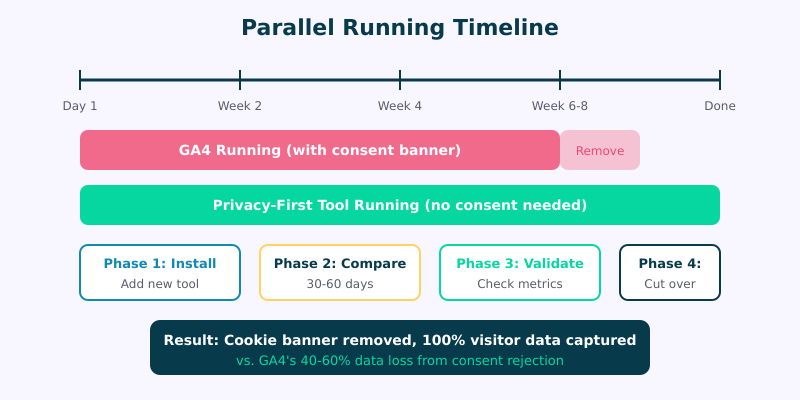
I recommend a 30 to 60 day parallel period for most sites. Thirty days is the minimum to capture a full business cycle. Sixty days gives you more statistical confidence, especially if your traffic is seasonal or fluctuates week to week.
Step 1 — Install Your New Tool Without Removing GA4
This is the part people overthink. You don’t need to change anything about your current GA4 setup. Just add the new tool alongside it.
Most privacy-first analytics tools — Plausible, Fathom, Simple Analytics, Matomo — require a single script tag in your site’s <head> section. That’s it. No tag manager configuration, no cookie consent integration, no complex event mapping.
Here’s the general approach:
- Sign up for your chosen privacy-first tool and add your domain.
- Copy the tracking script they provide. It’s typically one line of JavaScript, under 1 KB.
- Add it to your site’s header — through your theme settings, a header/footer plugin, or directly in your template. Place it alongside (not replacing) your existing GA4 snippet.
- Verify installation by visiting your site and checking the new tool’s real-time or live view. You should see your own visit appear within seconds.
A few things to watch for at this stage:
- Content Security Policy headers. If your site uses CSP, you’ll need to whitelist the new tool’s script domain.
- Caching. If you use aggressive page caching, clear your cache after adding the script so it appears on all pages immediately.
- Ad blockers. Privacy-first tools are blocked less often than GA4, but some blockers catch everything. Most privacy tools offer proxying options if this matters to you.
Don’t remove GA4 yet. Don’t disable it. Don’t touch it at all. You want both tools running simultaneously on every page, starting from the same moment.
Step 2 — Configure Both Tools Identically
For the parallel comparison to mean anything, both tools need to be measuring the same things in the same places. This is where people often create accidental discrepancies.
Check these configuration points:
- Page coverage. Confirm both scripts load on every page of your site. A common mistake is having GA4 on all pages but the new tool only on your main domain (missing subdomains or specific landing pages).
- Bot filtering. GA4 filters known bots by default. Most privacy tools do too, but verify this is enabled.
- Internal traffic. If you’ve excluded your office IP in GA4, consider doing the same in your new tool — or better yet, remove the GA4 exclusion temporarily so both tools see identical traffic.
- Event tracking. If you track specific conversions in GA4 (button clicks, form submissions, file downloads), set up equivalent goals or events in your new tool. The syntax will differ, but the triggers should match.
- Cross-domain tracking. If your user journey spans multiple domains, make sure both tools handle this the same way.
Write down your configuration choices. You’ll refer back to this when analyzing discrepancies in Step 3.
Step 3 — Compare Data for 30-60 Days
Now comes the waiting period. Let both tools collect data without interference. Resist the urge to tinker with settings during this phase — you want a clean comparison window.
I suggest checking in weekly rather than daily. Daily numbers are noisy. Weekly totals give you a much clearer picture of how the two tools compare.
Create a simple comparison spreadsheet with these columns:
- Week number
- GA4 pageviews vs. new tool pageviews
- GA4 unique visitors vs. new tool unique visitors
- GA4 top 10 pages vs. new tool top 10 pages
- GA4 top referral sources vs. new tool top referral sources
- Percentage difference for each metric
After two weeks, you’ll start seeing consistent patterns. The numbers won’t match exactly — and that’s completely expected. What you’re looking for is consistency in the discrepancy. If your new tool consistently shows 15% more unique visitors than GA4, that’s a stable, explainable difference. If the gap swings wildly from 5% to 40% week over week, something is misconfigured.
For most sites, I see a 10 to 30 percent discrepancy between GA4 and privacy-first tools. And here’s the part that surprises people: the privacy tool usually shows higher numbers, not lower. I’ll explain why in the differences section below.
Step 4 — Validate Key Metrics
After your parallel period, it’s time for a structured validation. Don’t just glance at dashboards — do a proper metric-by-metric comparison.
The five metrics that matter most:
- Total pageviews. These should be relatively close between tools (within 10-15%). Large gaps here usually indicate a script loading issue on certain pages.
- Unique visitors. Expect bigger discrepancies here (15-30%) because each tool defines and counts unique visitors differently. Cookie-based tools lose visitors who reject consent. Privacy tools count everyone.
- Top pages. The ranking of your most popular pages should be nearly identical, even if the absolute numbers differ. If your top 10 lists show the same pages in roughly the same order, your new tool is working correctly.
- Referral sources. Compare where your traffic comes from. Both tools should agree on whether Google, social media, or direct traffic is your biggest source. The percentages may differ slightly. Tag your campaign links with consistent UTM parameters so both tools attribute traffic identically.
- Conversions and goals. If you set up equivalent conversion tracking, compare the conversion counts. These are your most business-critical numbers, so pay extra attention here.
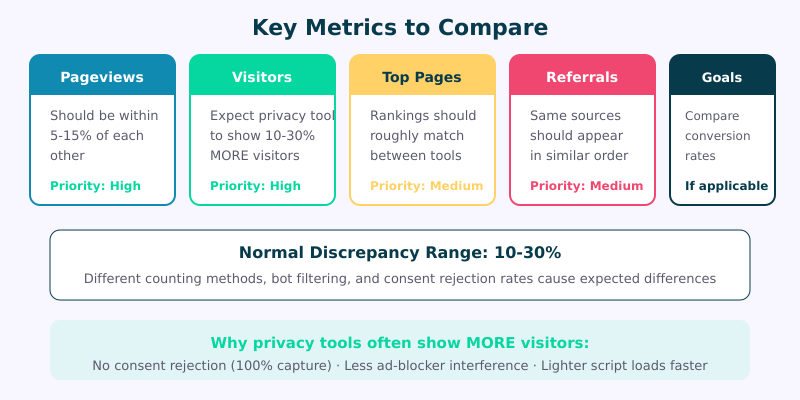
If the top page rankings match and the discrepancies are stable, your new tool is ready. If something looks off, check your configuration from Step 2 before extending the parallel period.
Step 5 — Make the Cut
You’ve validated the data. The numbers make sense. It’s time to remove GA4.
Here’s your cutover checklist:
- Export your GA4 historical data. Download key reports as CSV or use the GA4 API to pull historical data. Once you remove the tracking code, you can still access GA4’s interface, but it’s good practice to have local backups.
- Remove the GA4 tracking script from your site. If you use Google Tag Manager primarily for GA4, remove GTM as well.
- Remove your cookie consent banner if GA4 was the only reason you had one. Privacy-first tools don’t use cookies, so you likely don’t need consent prompts anymore. This alone improves user experience and can boost engagement metrics.
- Update your privacy policy to reflect that you no longer use Google Analytics and now use a privacy-friendly alternative.
- Clear your site cache to ensure the GA4 script stops loading immediately for all visitors.
- Verify removal by checking your site’s source code — the GA4 snippet should be completely gone.
If you conducted a GA4 privacy audit before starting this process, revisit it now. Every compliance concern you flagged should be resolved by completing this switch.
What Differences to Expect
Let’s address the elephant in the room: your numbers will differ between tools, and that doesn’t mean either tool is broken.
Why privacy-first tools often show more visitors than GA4:
- Consent rejection. In regions with GDPR or similar laws, 30 to 60 percent of visitors reject cookie consent banners. GA4 can’t track those visitors. Privacy-first tools don’t need consent, so they capture 100% of visits. This is the single biggest reason for discrepancies — model it precisely with our Consent Impact Dashboard.
- Ad blocker behavior. GA4 is on virtually every ad blocker’s default list. Privacy-first tools are blocked far less frequently. Some studies show GA4 is blocked by 25-40% of technical audiences.
- Script loading failures. GA4’s heavier scripts occasionally fail to load on slow connections or older devices. Lightweight privacy scripts (typically 1-3 KB vs. GA4’s 30+ KB) load more reliably.
Why some metrics might be lower in privacy tools:
- Session counting. Privacy tools often use a simpler session model. GA4’s session logic includes factors like campaign changes mid-visit, which can inflate session counts.
- Bot detection. Some privacy tools have stricter bot filtering, which may reduce pageview counts slightly.
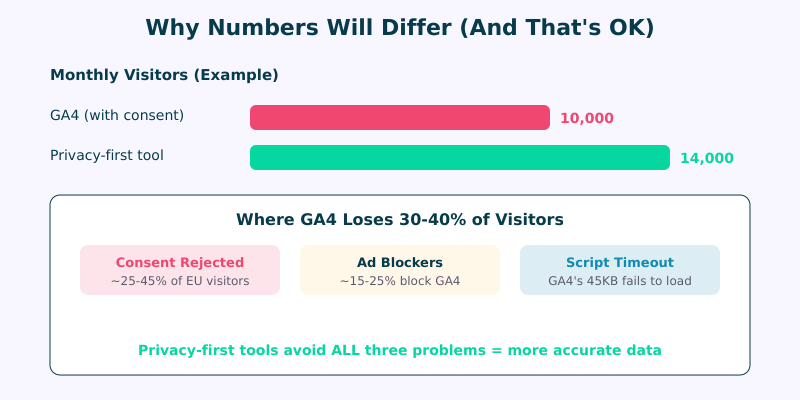
Here’s what I tell every client: the data from your cookie-free tool is more accurate, not less. It’s capturing the visitors that GA4 systematically misses. Those “missing” visitors in GA4 aren’t ghosts — they’re real people who either rejected cookies or use ad blockers. Your privacy-first tool sees them all.
For a broader look at what’s available, check the full comparison of Google Analytics alternatives.
FAQ
How long should I run analytics in parallel?
I recommend 30 to 60 days for most sites. Thirty days captures a complete business cycle and gives you four weekly comparison points. If your site has strong seasonal patterns or you need extra confidence for stakeholder buy-in, extend to 60 days. Sites with very low traffic (under 1,000 monthly visitors) should lean toward 60 days to get statistically meaningful comparisons.
Will running two analytics scripts slow down my site?
The impact is negligible. Privacy-first analytics scripts are typically 1-3 KB and load asynchronously, meaning they don’t block page rendering. Combined with GA4’s script, you’re adding a few kilobytes of JavaScript — far less than a single social media embed or hero image. During the 30-60 day parallel window, the minor overhead is a worthwhile trade-off for migration confidence. You can verify this with a before-and-after Lighthouse test.
What if the numbers between tools are wildly different?
If you’re seeing discrepancies above 30%, something is likely misconfigured rather than fundamentally wrong with either tool. Start by checking that both scripts load on every page. Then verify bot filtering settings, IP exclusions, and domain configuration. A common culprit is the new tool only tracking your primary domain while GA4 also captures subdomain traffic. If discrepancies persist after configuration checks, contact your new tool’s support team — they’ve seen every migration scenario and can usually diagnose the issue quickly.
Can I run the parallel period with Google Tag Manager?
Yes, but I actually recommend against it for the new tool. Most privacy-first analytics tools perform best when installed as a direct script in your site’s header rather than through GTM. Tag managers add an extra layer of JavaScript execution, which can delay tracking and introduce edge cases. Keep GA4 in GTM if that’s your current setup, but add the new tool’s script directly. This also makes the eventual cutover cleaner — when you’re done, you simply remove GTM entirely along with GA4.
Ready to Switch
Running analytics in parallel isn’t complicated, but it does require patience. Resist the urge to rush through the comparison period. Those 30 to 60 days of side-by-side data are the foundation of a confident migration — they give you proof that your new tool captures everything you need, and usually more than GA4 was showing you.
The pattern I see again and again: people start the parallel period worried they’ll lose data, and they end it realizing they’d been missing data all along. When 30-60% of your visitors never showed up in GA4 because of consent rejection, switching to a cookie-free tool doesn’t just protect privacy — it gives you a more complete picture of your actual audience.
Start your parallel period today. Your future self — and your data — will thank you. Head back to the complete migration guide for the full roadmap.