Where your analytics data lives matters more than most site owners realize. It’s not just a technical decision — it shapes your privacy posture, your ongoing costs, and how much control you actually have when regulations change or a vendor pivots. If you’re exploring Google Analytics alternatives, one of the first forks in the road is this: self-hosted or cloud?
I’ve deployed both models dozens of times over twelve years, and the right answer depends on your team, your budget, and how seriously you take data sovereignty. Let me walk you through the real differences — not the marketing versions.
What Self-Hosted Analytics Actually Means
Self-hosted analytics means you install the tracking software on infrastructure you control. That could be a VPS from Hetzner, a dedicated server in a local data center, or even a Raspberry Pi in your office closet. The point is: the data never leaves hardware you manage.
The most popular self-hosted options right now:
- Matomo (On-Premise) — the most mature open-source analytics platform, free to install, requires PHP and MySQL, and needs roughly 2 GB of RAM for moderate traffic sites
- Umami — lightweight, privacy-focused, runs on Node.js with PostgreSQL or MySQL
- Plausible Community Edition — the open-source version of Plausible, self-hosted via Docker
- PostHog — goes beyond pageviews into product analytics, feature flags, and session replay
With self-hosting, you handle installation, updates, backups, database maintenance, and uptime monitoring. In return, you get complete data sovereignty. No third party ever touches your visitor data. For organizations bound by strict data residency laws — healthcare, finance, government — this can be a hard requirement, not a preference.
What Cloud Analytics Means
Cloud analytics means the vendor runs the infrastructure. You add a script to your site, data flows to their servers, and you access dashboards through their web app. The vendor handles uptime, scaling, backups, and security patches.
The leading privacy-first cloud options:
- Plausible — starts at $9/month, EU-hosted, cookie-free by default
- Fathom — starts at $15/month, built on Cloudflare’s global network, simple and fast
- Matomo Cloud — starts at EUR 23/month, same feature set as self-hosted but fully managed
- Simple Analytics — EU-based, minimal tracking, strong privacy defaults
With cloud analytics, you’re operating under a shared responsibility model. The vendor secures the infrastructure and keeps the software updated. You’re responsible for configuring tracking correctly — including setting up consistent UTM tagging for campaign attribution — and reviewing their data processing agreement. Your data sits on their servers — which means you’re trusting their privacy practices and the legal jurisdiction they operate in.
Privacy Comparison
This is where the decision gets serious. Let me be direct about the differences.
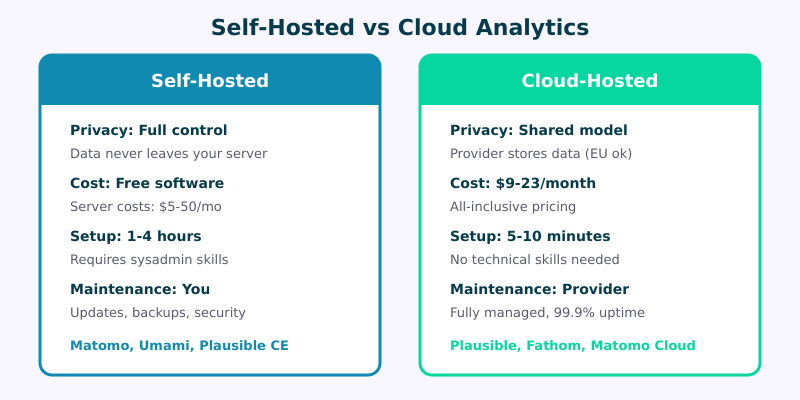
With self-hosted analytics, your visitor data stays on your server. Period. No sub-processors, no cross-border transfers, no vendor data processing agreements to vet. If you’re running Matomo on a server in Frankfurt, your data lives in Frankfurt. You control encryption at rest, access controls, and retention policies down to the database level. For GDPR compliance, this is the cleanest path because you are both the data controller and the data processor. Use our Consent Logic Planner to map which hosting model reduces consent requirements in your target regions.
Cloud analytics providers like Plausible and Fathom have built strong privacy architectures. They don’t use cookies, they anonymize IP addresses, and they don’t track users across sites. But your data still transits through and resides on their infrastructure. You need to trust their DPA, verify their sub-processors, and accept that a legal jurisdiction change or acquisition could alter the privacy landscape.
If you’ve already set up privacy-focused analytics on WordPress, you know how much the implementation details matter. The hosting model is the foundation those details sit on.
For most small-to-medium sites, a reputable cloud provider offers privacy that’s good enough — genuinely good, not a compromise. But for organizations handling sensitive data or operating under strict regulatory frameworks, self-hosting eliminates an entire category of risk.
Cost Comparison
People often assume self-hosting is “free.” It’s not. Here’s an honest breakdown.
| Factor | Self-Hosted | Cloud |
|---|---|---|
| Software cost | Free (open-source) | $9–$23+/month |
| Server cost | $5–$40/month (VPS) | Included |
| Setup time | 2–8 hours | 10–15 minutes |
| Maintenance | 2–4 hours/month | Near zero |
| Privacy | Full data sovereignty | Vendor-dependent |
| Reliability | You manage uptime | 99.9%+ SLA typical |
| Scaling | Manual (upgrade server) | Automatic |
| Total first-year cost | $60–$480 + your time | $108–$276 |
The hidden cost of self-hosting is your time. If you value your hours at $50–$100, those monthly maintenance sessions add up fast. A Matomo instance that needs a PHP upgrade, a database optimization, or a security patch isn’t asking for money — it’s asking for your Saturday morning.
Cloud wins on pure economics for small teams. Self-hosting starts making financial sense when you’re managing analytics for multiple sites (one Matomo instance can track dozens of domains) or when your traffic volume would push cloud pricing into the $50+/month range.
Maintenance and Reliability
I’ve seen self-hosted Matomo instances go down because someone forgot to renew the SSL certificate. I’ve seen databases fill up because log rotation wasn’t configured. These aren’t exotic failures — they’re Tuesday.
Self-hosted maintenance includes:
- Software updates (Matomo releases monthly, security patches can be urgent)
- Server OS updates and security patches
- Database optimization and cleanup
- SSL certificate renewal
- Backup verification (backups you don’t test aren’t backups)
- Uptime monitoring and alerting
- Scaling when traffic spikes hit
Cloud providers handle all of this. Plausible and Fathom both run on distributed infrastructure with built-in redundancy. You’re paying for their ops team to wake up at 3 AM instead of you.
That said, cloud isn’t risk-free. Vendor outages happen. If Fathom goes down, you lose tracking data for that window and there’s nothing you can do about it. With self-hosting, at least the fix is in your hands — assuming you have the skills to execute it quickly.
When to Self-Host
Self-hosting is the right call when:
- Data residency is a legal requirement. Healthcare, financial services, government contracts — if regulators mandate where data lives, self-hosting gives you airtight control.
- You have ops capacity. Either you’re comfortable managing Linux servers or your team includes someone who is. This isn’t a “learn as you go” situation for production analytics.
- You’re tracking multiple sites. One Matomo instance handling 10+ domains costs the same as one — that’s compelling economics compared to per-site cloud pricing.
- You need deep customization. Self-hosted Matomo supports custom dimensions, raw data exports, and plugin development. PostHog offers even more extensibility.
- You distrust third parties on principle. Some organizations have a zero-trust stance toward external data processors. That’s valid, and self-hosting is the answer.
When to Choose Cloud
Cloud analytics makes more sense when:
- You’re a small team or solo operator. Your time is better spent on content and strategy than server maintenance. A $9/month Plausible subscription buys back hours every month.
- You want to be tracking within minutes, not hours. Cloud setup is literally: sign up, paste a script tag, done.
- You don’t have server admin skills. An unmaintained self-hosted instance is worse than no analytics — it’s a security liability.
- Reliability matters more than absolute control. Cloud providers offer SLAs and redundancy that most self-hosted setups can’t match without significant investment.
- Your traffic is moderate. Under 100k monthly pageviews, cloud pricing is very reasonable and eliminates all operational overhead.
For a deeper look at how specific cloud providers compare to each other, check out my Plausible vs Fathom vs Matomo comparison.
Frequently Asked Questions
Can I migrate from cloud to self-hosted later?
Yes, but it depends on the platform. Matomo Cloud allows full data export that you can import into a self-hosted instance — it’s one of the cleanest migration paths in analytics. Plausible and Fathom offer CSV exports, but re-importing historical data into a different self-hosted tool requires custom scripting. My advice: start wherever makes sense today. Migration is possible but never seamless, so factor that into your planning.
Is self-hosted analytics truly free?
The software is free. The infrastructure isn’t. At minimum, you need a VPS ($5–$20/month), a domain, and SSL. More importantly, you need time — setup takes a few hours and ongoing maintenance adds up to 2–4 hours per month. If you’re doing this yourself, calculate your hourly rate and multiply. “Free” often costs more than a cloud subscription when you account for labor.
Which self-hosted option is easiest to install?
Umami is the easiest if you’re comfortable with Docker. A basic Docker Compose setup gets you running in about 30 minutes. Plausible CE also uses Docker and is nearly as straightforward. Matomo has the most detailed documentation and the largest community, but the installation involves more steps — configuring PHP, setting up MySQL, tuning the archive cron job. PostHog is the heaviest to run, best suited for teams that already manage containerized infrastructure.
Do cloud analytics providers sell my data?
The reputable privacy-first providers — Plausible, Fathom, Simple Analytics — explicitly do not sell, share, or monetize visitor data. Their business model is straightforward: you pay a subscription, they provide analytics. This is fundamentally different from Google Analytics, where the “free” product is subsidized by advertising data. Always read the provider’s privacy policy and DPA, but the privacy-first cloud vendors have built their entire brand on not being data brokers.
The Bottom Line
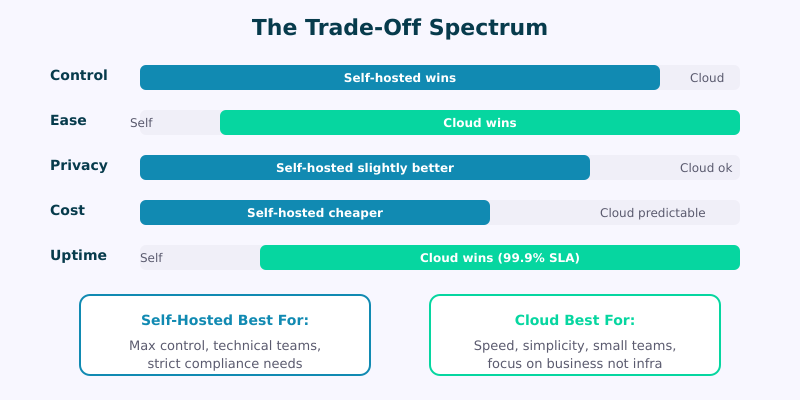
Self-hosted and cloud analytics aren’t good versus bad — they’re different trade-off profiles. Self-hosting gives you maximum privacy and control in exchange for your time and technical effort. Cloud gives you convenience and reliability in exchange for money and a degree of trust in your vendor.
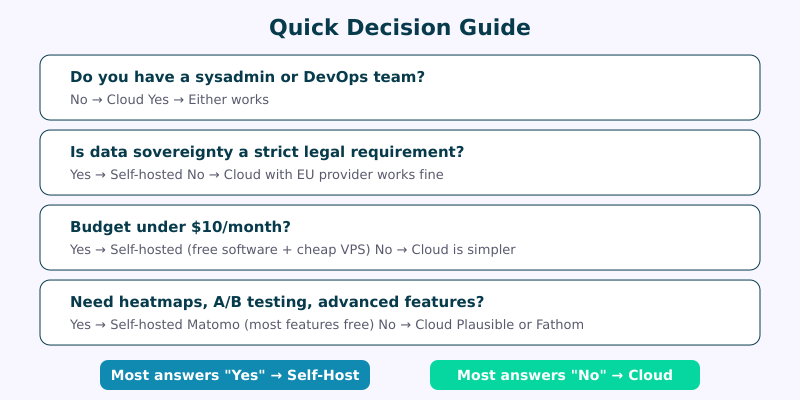
For most WordPress site owners exploring alternatives to Google Analytics, I recommend starting with a cloud provider like Plausible or Fathom. You’ll be up and running in minutes with strong privacy defaults. If your needs evolve — more sites, stricter compliance requirements, deeper customization — self-hosting will be there when you’re ready.
The most important decision isn’t where your analytics are hosted. It’s that you’ve chosen a privacy-first approach in the first place. Either path puts you ahead of the vast majority of sites still feeding visitor data into surveillance-based platforms.